How to Redirect www, non-www and HTTP to HTTPS in One Hop
Four versions of your address should reach one canonical URL in a single redirect. Test all four, set WordPress to match, then write one combined rule at the server or CDN.
Your site answers on four addresses: http://example.com, http://www.example.com, https://example.com and https://www.example.com. Only one of them should be the real one. The other three should send visitors there in one step. On many sites they do not: http://www goes to https://www, which then goes to https://example.com. PageSpeed Insights flags it as Avoid multiple page redirects, Search Console lists pages under Page with redirect or Duplicate without user-selected canonical, and some variants may not redirect at all.
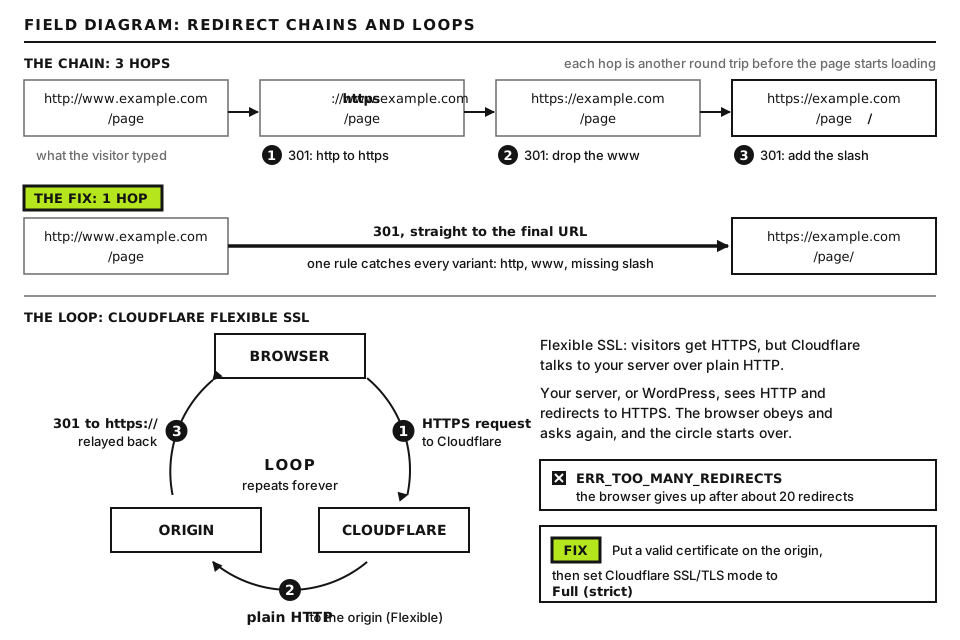
The cause is nearly always the same. Several layers each fix one part of the address. The server fixes the scheme (http to https), then WordPress or a plugin fixes the host (www or not), and each fix is a separate round trip. The cure is to decide on one canonical address and have the first layer that sees a request send it straight there.
What is happening
Every redirect is a full extra request. The browser receives a 301 with a Location header, then connects again. If the host changes (www to bare domain), that can mean a new DNS lookup, a new TCP connection and a new TLS handshake before the page even starts loading, which is noticeable on mobile connections. Google’s crawlers follow up to 10 hops, so a two-hop chain will not stop indexing, but it wastes crawl time and delays every first visit.
Three hops cost three round trips. One rule can send every variant to the final URL. Open full size
This is what you want, with https://example.com chosen as canonical:
Request
Correct response
Common bad response
http://example.com/PAGE/
301 to https://example.com/PAGE/
No redirect (page served over http)
http://www.example.com/PAGE/
301 to https://example.com/PAGE/
301 to https://www.example.com/PAGE/, then a second 301
https://www.example.com/PAGE/
301 to https://example.com/PAGE/
Certificate error, or the page served on www too
https://example.com/PAGE/
200 OK
A redirect to itself with a slash added or removed
The path and query string must be kept: /PAGE/?utm_source=SOURCE should arrive intact, not dumped on the homepage.
www or not?
Search engines do not prefer either. Pick one and never change it. Two practical points: a bare domain cannot hold a CNAME record in standard DNS, so if your CDN or platform asks you to point a CNAME at it, either use www or a DNS provider that supports CNAME flattening or ALIAS records. And cookies set on a bare domain are sent to every subdomain, which some larger sites avoid by using www. If the site already has years of history on one version, keep that one.
Redirect loops, where two layers disagree and bounce visitors back and forth, are covered in the ERR_TOO_MANY_REDIRECTS guide (FG-03). This guide is about removing extra hops and gaps once nothing is looping.
Before you start
Access you need: SFTP or SSH to edit .htaccess or the Nginx config, the WordPress dashboard or WP-CLI, and your CDN dashboard (for example Cloudflare) if traffic passes through one.
Back up.htaccess, the Nginx site config and a note of any existing CDN rules before editing.
How to run commands. Commands starting with curl or for run in a terminal on your own computer: built in on macOS and Linux; on Windows use WSL, because the loops below use bash syntax. Commands starting with wp run over SSH in the site’s folder, the one containing wp-config.php; on some hosts it is wp-cli. Blocks starting with RewriteEngine, server, Header or add_header are lines in a config file.
Use 302 while testing. Browsers cache 301s. Write each new rule with a temporary code, prove it with curl, then switch it to 301.
Step 1: Measure what happens now
for u in http://example.com http://www.example.com https://example.com https://www.example.com; do
  echo "== $u/SAMPLE-PAGE/"
  curl -sIL "$u/SAMPLE-PAGE/" | grep -i -E "^(HTTP|location)"
done
Replace every example.com with your bare domain and SAMPLE-PAGE with the slug of a real inner page (testing only the homepage hides path problems). -s hides progress, -I asks for headers only, -L follows redirects, and grep keeps just the status lines and Location headers. Good output shows, for each variant, at most one 301 and one location: line pointing at the canonical address, then 200. Bad output is two or more location: lines for one variant, a 200 on a non-canonical variant, or a curl error such as SSL: no alternative certificate subject name matches, which means the certificate does not cover that host name.
Step 2: Make WordPress agree with your choice
WordPress has its own redirect for the host. On each request it compares the address with the home setting and, through a function called redirect_canonical, sends mismatched hosts to the right one. That is usually the second hop: the server upgrades http://www to https://www, then WordPress moves it to the bare domain.
wp option get home
wp option get siteurl
Type as shown. Both should print exactly the canonical address, for example https://example.com, with no trailing slash. If they differ, set them with wp option update home 'https://example.com' and the same for siteurl, replacing the address with yours. Also check wp-config.php for WP_HOME or WP_SITEURL lines, which override the database. Keep WordPress’s own redirect in place as a safety net; the next step makes sure requests are already correct by the time they reach it.
Step 3: One combined rule on Apache or LiteSpeed
The usual mistake is two separate rules, one for https and one for www, each redirecting on its own. Combine the conditions so any wrong part of the address triggers a single redirect to the full canonical address. Put this in .htaccess above # BEGIN WordPress, and remove any older https or www rules.
For a bare-domain canonical:
RewriteEngine On
RewriteCond %{HTTPS} off [OR]
RewriteCond %{HTTP_HOST} !^example\.com$ [NC]
RewriteRule ^ https://example.com%{REQUEST_URI} [R=301,L]
Replace both occurrences of example.com with your domain, keeping the backslash before the dot in the condition. The first condition catches plain http, [OR] links it to the second, and the second catches any host that is not exactly your domain (www, an old alias, the server’s IP address). %{REQUEST_URI} is the path, filled in by the server; the query string is carried over automatically. Writing the destination host by hand, rather than reusing %{HTTP_HOST}, is what makes it one hop.
For a www canonical, use the same three lines with !^www\.example\.com$ in the second condition and https://www.example.com in the rule.
If the site sits behind a proxy or CDN that connects to the server over plain http, %{HTTPS} is always off and this rule loops. Replace the first condition with RewriteCond %{HTTP:X-Forwarded-Proto} !https, or better, make the proxy connect over HTTPS (see FG-03).
Step 4: Separate server blocks on Nginx
On Nginx, use one server block per job instead of if statements:
Replace example.com with your domain, and PATH_TO_FULLCHAIN and PATH_TO_PRIVATE_KEY with the certificate paths already used in your main server block (copy them from there). $request_uri is the path plus query string, filled in by Nginx. The first block sends every plain http request, either host, straight to the canonical https address. The second catches https on www. Your existing main block keeps server_name example.com; alone and serves the site. Check with nginx -t and apply with systemctl reload nginx. If your host manages Nginx for you, ask them for “a single-hop redirect to https://example.com for all variants”.
Step 5: Or do it at the CDN edge (Cloudflare)
When traffic is proxied through Cloudflare, redirecting at the edge is fastest: the visitor never reaches your server for the wrong variant. Cloudflare’s current tool for this is Single Redirects, found under Rules in the domain’s dashboard (the area has been labeled Redirect Rules in some versions of the dashboard). It offers ready-made templates for “www to root” and “root to www”. A hand-built rule for a bare-domain canonical looks like this:
When incoming requests match: custom expression (http.host eq "www.example.com")
Then: URL redirect, type Dynamic, expression concat("https://example.com", http.request.uri.path)
Status code: 301, with Preserve query string checked.
Replace example.com with your domain in both places. http.host is the host name the visitor asked for, http.request.uri.path is their path, and concat joins your fixed canonical origin onto that path. Preserve query string keeps tracking parameters; leave it off only if the target already contains a query string, which Cloudflare rejects.
Points that catch people out:
Rules only run on proxied hostnames. The www DNS record must exist and show the orange cloud (Proxied). A redirect rule on a gray-cloud (DNS only) name never fires. If www exists only to redirect, Cloudflare’s documentation suggests a proxied placeholder record pointing at an address that is never contacted.
Always Use HTTPS (SSL/TLS, Edge Certificates) upgrades http to https on the same host. Combined with a www rule, http://www can take two hops. Run the Step 1 loop; if you see two, add or not ssl to the rule’s expression so plain http requests on either host are caught by the same rule, and recheck.
Page Rules are the old way. Cloudflare recommends its newer Rules products for new setups, points users to Single Redirects (for patterns) and Bulk Redirects (for long lists of fixed URLs), and has said it will migrate existing Page Rules automatically. Existing Forwarding URL page rules still work for now, and Single Redirects take precedence over them when both match, but do not add new ones, and remove any that duplicate a newer rule.
Origin Rules are not redirects. Despite the name, Cloudflare’s Origin Rules change which server, port or host header Cloudflare uses to reach your origin. Visitors never see them. If you meant “rules on my origin server”, that is Steps 3 and 4.
Choose one layer as the enforcer. Edge and server rules can coexist if they agree exactly, but every extra copy is another place to forget when something changes.
Step 6: Check the certificate covers every variant
A redirect from https://www.example.com can only happen after a successful TLS handshake on that name. If the certificate covers only the bare domain, visitors who type www get a full-page security warning, not a redirect.
Run on your computer. Replace both domains with yours: the first is where to connect, and -servername is the host name being tested. echo | closes the connection straight away, 2>/dev/null hides handshake chatter, and -ext subjectAltName prints the names the certificate covers (OpenSSL 1.1.1 or newer). Good output lists both DNS:example.com and DNS:www.example.com. If one is missing, reissue the certificate with both names in your hosting panel or certificate tool; our certificate name mismatch guide covers that error in depth.
Step 7: Align rel=canonical, sitemaps and internal links
Redirects are the strongest signal of your preferred address, but Google also reads the rel="canonical" tag in each page’s HTML. WordPress core prints one on single posts and pages, and SEO plugins take over that job when installed.
Replace the domain and SAMPLE-PAGE as before. -o prints only the matching tag, and the dots around canonical match either quote style. Good output is one tag whose href is the canonical address of that same page. Bad output is a tag naming the www or http version, two different tags (theme and plugin both printing one), or none at all on a page you want indexed. Also check that the XML sitemap and internal links use the canonical form; links still pointing at http:// or the other host make every internal click take a needless redirect.
Advanced: HSTS, preload and measuring the cost of hops
Add HSTS only when everything is stable
HTTP Strict Transport Security tells browsers to use HTTPS for your domain without even trying http, which removes the http hop entirely for returning visitors. It is also hard to undo, because browsers remember it for the whole max-age. Turn it on only after your redirects and certificates have run cleanly, and ramp up:
Header always set Strict-Transport-Security "max-age=MAX_AGE_SECONDS"
This is the Apache form, for .htaccess or the virtual host (it needs mod_headers). On Nginx, use add_header Strict-Transport-Security "max-age=MAX_AGE_SECONDS" always; in the https server block. On Cloudflare, use the HSTS option under SSL/TLS, Edge Certificates. MAX_AGE_SECONDS is how long browsers remember the rule: start with a few minutes (such as 300), check nothing breaks, then a week, then 31536000 (one year). Add ; includeSubDomains only when every subdomain, including ones for email webmail or old tools, works over HTTPS. always makes the header appear on error responses too.
The HSTS preload list (hstspreload.org) bakes your domain into browsers. It requires a long max-age, includeSubDomains and preload, and it expects http to redirect to https on the same host first. That means http://www.example.com must go to https://www.example.com before moving to the bare domain: a deliberate two-hop exception for that one variant, which preloaded browsers skip anyway. Removal from the list takes months, so treat preload as a one-way door.
Put a number on each hop
curl -sL -o /dev/null -w "hops %{num_redirects}, redirect time %{time_redirect}s, total %{time_total}s\n" http://www.example.com/
Replace the domain with yours. -L follows redirects, -o /dev/null discards the page, and -w prints the number of redirects, the seconds spent on them and the total. Run it before and after your fix from the same network. Going from two hops to one should cut the redirect time noticeably; zero hops on the canonical address is the target.
When to contact your host
Open a ticket if you cannot edit the server config, if the certificate cannot be issued for both names, or if a redirect you cannot find in .htaccess, WordPress or your CDN keeps adding a hop (some hosts add their own http to https redirect at the server level). Send:
The output of the Step 1 loop, with the time you ran it in UTC.
Your chosen canonical address and which layer you want to enforce it.
Whether a CDN or proxy sits in front, and its SSL mode.
The openssl output from Step 6 if a certificate name is missing.
Did this fix it?
Still stuck? Start again from what you can see in the Emergency Room.
Still stuck?
Print a free one-page checklist to keep, or open the Emergency Room if the symptom does not match.
Two rules are sending visitors back and forth. Trace the loop with curl or the Network tab, then fix the WordPress URLs, the HTTPS setup behind your CDN, or the duplicate redirect rule causing it.
HSTS removes the “proceed anyway” link, so any certificate fault locks visitors out. Learn how the header works, how to clear it for testing, and how to roll it out safely.
The TLS handshake fails before any certificate check. Find out whether port 443 speaks HTTP, has no certificate, or offers no shared TLS version or cipher.