How to Fix ERR_SSL_PROTOCOL_ERROR, ERR_SSL_VERSION_OR_CIPHER_MISMATCH and Cloudflare 525
The TLS handshake fails before any certificate check. Find out whether port 443 speaks HTTP, has no certificate, or offers no shared TLS version or cipher.
The browser does not get as far as checking your certificate. Chrome shows “This site can’t provide a secure connection” with ERR_SSL_PROTOCOL_ERROR or ERR_SSL_VERSION_OR_CIPHER_MISMATCH. Firefox shows “Secure Connection Failed” with codes such as SSL_ERROR_RX_RECORD_TOO_LONG, SSL_ERROR_NO_CYPHER_OVERLAP or SSL_ERROR_UNSUPPORTED_VERSION. Behind Cloudflare, visitors see “Error 525: SSL handshake failed”. Command line tools report “SSL handshake failed”, “wrong version number” or “handshake failure”.
All of these mean the two sides could not agree on how to start an encrypted conversation. Either the server is not speaking TLS on port 443 at all, it has no certificate to offer for the requested name, or the client and server share no TLS version or cipher suite. This usually follows a server config change, a new server build, a CDN setting change or a hardened security profile.
What is happening
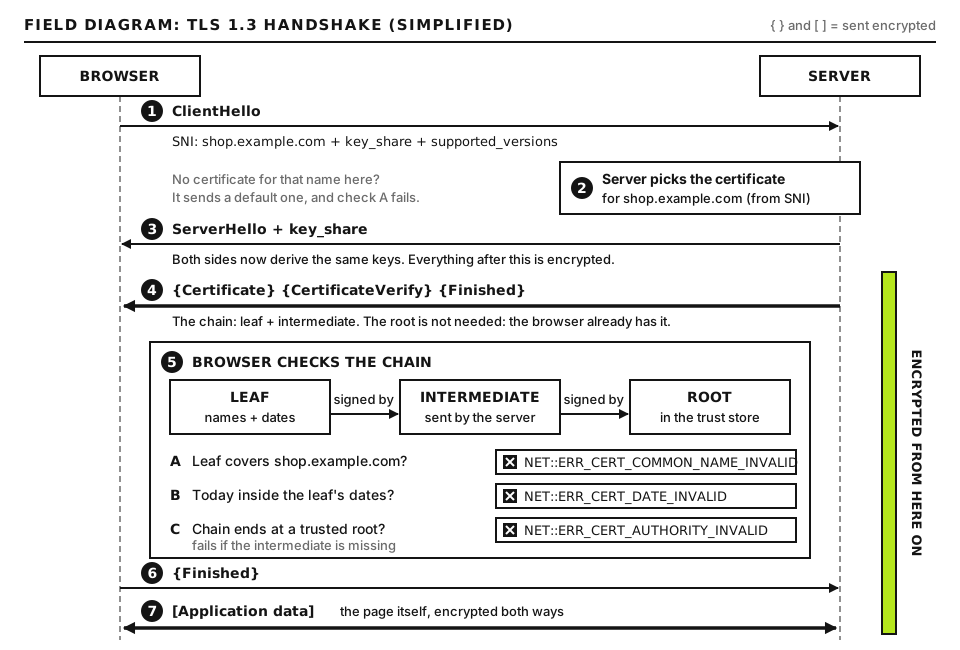
A TLS handshake starts with the client’s ClientHello. It lists the TLS versions the client supports, its cipher suites, and the hostname it wants (the SNI extension). The server replies with a ServerHello that picks one version and one cipher, then sends its certificate. If the server cannot pick, or answers with something that is not TLS at all, the handshake stops.
A simplified TLS 1.3 handshake. Protocol errors happen before any certificate is checked. Open full size
Error
Most likely meaning
ERR_SSL_PROTOCOL_ERROR, SSL_ERROR_RX_RECORD_TOO_LONG, curl “wrong version number”
Port 443 answered with plain HTTP or another non-TLS protocol, or the connection was cut mid-handshake.
No shared TLS version or cipher, or no certificate configured for that hostname (common with uncovered CDN subdomains).
SSL_ERROR_UNSUPPORTED_VERSION
The server only offers TLS 1.0 or 1.1, which current browsers have disabled.
Cloudflare 525
Cloudflare reached your origin, but the handshake between Cloudflare and the origin failed. It appears with the Full and Full (strict) encryption modes.
Cloudflare 526
Handshake worked, but the origin certificate failed validation in Full (strict). This is a certificate problem, not a handshake one.
Today, TLS 1.2 and TLS 1.3 are the only versions in normal use. The major browsers began disabling TLS 1.0 and 1.1 in 2020, so a server limited to those is unreachable for modern browsers. Going the other way, a server that only offers TLS 1.3 will refuse older clients, such as legacy payment gateway callbacks or old operating systems, which shows up as handshake failures in API logs rather than in browsers.
Before you start
You need SSH or panel access to the web server, permission to edit its web server config, and access to your CDN dashboard if one is in front. Before editing any config file, copy it, for example sudo cp /etc/nginx/nginx.conf /etc/nginx/nginx.conf.bak, so you can roll back.
How to run the commands in this guide. Tests run on your own computer so you see what visitors see. On macOS and Linux, openssl and curl are in Terminal. Note that macOS ships LibreSSL as openssl, which lacks some flags; installing OpenSSL through a package manager gives you the full tool. On Windows, use WSL for these commands; curl.exe also works in PowerShell for the curl tests. Commands marked as server commands run in an SSH session on the web server. WordPress itself is not involved in a handshake failure, so wp-cli does not help here, and our diagnostic tools page lists external testers if you cannot run commands at all.
Step 1: Get the exact error from curl and openssl
Browser messages are vague. curl prints the handshake step by step:
curl -v https://example.com/ -o /dev/null
Run this on your computer, replacing example.com with the failing hostname. -v prints the connection and handshake details. -o /dev/null throws the page body away so you only see the conversation (on Windows PowerShell use -o NUL). Good output includes lines like SSL connection using TLSv1.3 / TLS_AES_256_GCM_SHA384 followed by the server certificate details and an HTTP status. Bad output stops early with one of these:
error:0A00010B:SSL routines::wrong version number: the server answered in plain text. Go to Step 2.
sslv3 alert handshake failure or alert handshake failure: the server rejected the offer, usually no shared cipher or version, or no certificate for this name. Go to Steps 3 and 4.
Connection reset by peer or unexpected eof while reading: something closed the connection mid-handshake, such as a firewall, a crashed service or a proxy. Check Step 2 and the server error log.
Then try openssl, which shows what the server offered:
Run this on your computer. -connect sets host and port, -servername sends the SNI name, and </dev/null closes the session after the handshake. Good output shows a certificate chain, then lines such as New, TLSv1.3, Cipher is TLS_AES_256_GCM_SHA384 and Verify return code: 0 (ok). Bad output shows no peer certificate available and Cipher is (NONE), which means the handshake never completed.
Step 2: Check for plain HTTP on port 443
The most common cause of ERR_SSL_PROTOCOL_ERROR on a self-managed server is a listener on port 443 that is not configured for TLS. The server replies with an ordinary HTTP response, and the browser cannot parse it as a TLS record.
Confirm it
curl -v http://example.com:443/
Run this on your computer. Note the http:// scheme with port :443: you are deliberately speaking plain HTTP to the HTTPS port. If you get an HTTP response, such as HTTP/1.1 200 OK or 400 Bad Request with HTML, port 443 is speaking plain HTTP and this is your cause. A correctly configured server returns an error here instead, often a 400 page saying “The plain HTTP request was sent to HTTPS port” on Nginx, or a closed connection.
Fix it on Nginx
The usual mistake is listen 443; without the ssl keyword. In the server block for your site, a file you edit on the server:
Replace example.com in the paths with the folder your certificate lives in. ssl on each listen line turns on TLS for that socket, and the second line covers IPv6. ssl_certificate must point to the full chain file and ssl_certificate_key to the matching private key. Then run sudo nginx -t, which should print “syntax is ok” and “test is successful”, and sudo systemctl reload nginx.
Fix it on Apache
On Apache, check that mod_ssl is loaded and that the port 443 virtual host turns TLS on. In the <VirtualHost *:443> block you need SSLEngine on, SSLCertificateFile and SSLCertificateKeyFile. On Debian and Ubuntu, sudo a2enmod ssl enables the module and sudo a2ensite SITE_CONF enables the site file, where SITE_CONF is the name of the config file in /etc/apache2/sites-available/. Run sudo apachectl configtest (good output: “Syntax OK”), then reload Apache.
Step 3: Check for a missing certificate for this name
If no server block on port 443 has a certificate for the requested name, the handshake fails. Nginx records this clearly in its error log, usually /var/log/nginx/error.log:
Run this on the server. tail -n 50 shows the last 50 lines and grep -i ssl keeps lines mentioning SSL in any case. A line containing no "ssl_certificate" is defined in server listening on SSL port while SSL handshaking means a request matched a 443 server block (often the default one) that has no certificate. Give that block a certificate, or add your hostname to the server_name of a block that has one. On Apache, check /var/log/apache2/error.log or /var/log/httpd/ssl_error_log for mod_ssl errors at the time of your test.
With a CDN, the same symptom appears at the edge. Cloudflare’s free Universal SSL certificate covers the apex and first-level subdomains only, so a name like dev.shop.example.com has no edge certificate and browsers report ERR_SSL_VERSION_OR_CIPHER_MISMATCH. Cloudflare’s documented fixes are Total TLS, an Advanced Certificate or a custom certificate. A brand-new zone can also take a while before its Universal certificate is active; check SSL/TLS, Edge Certificates in the dashboard.
A certificate that exists but names the wrong host gives a name mismatch rather than a handshake error, which our guide to NET::ERR_CERT_COMMON_NAME_INVALID covers.
Step 4: Check TLS versions and cipher suites
Test each TLS version on its own. On your computer:
-tls1_2 and -tls1_3 restrict openssl to exactly that version. 2>&1 merges error messages into the output so grep sees them, and the pattern keeps the lines that name the protocol, the cipher or a TLS alert. Good output for a supported version shows the protocol and a real cipher name, such as Cipher is ECDHE-RSA-AES128-GCM-SHA256 for TLS 1.2. Bad output shows alert protocol version, handshake failure or Cipher is (NONE) for that version. A healthy public site passes both. If both fail, the server likely offers only TLS 1.0 or 1.1, or uses ciphers no modern client accepts.
--tlsv1.2 sets the minimum version and --tls-max 1.2 the maximum, pinning the test to TLS 1.2. Swap both to 1.3 to test TLS 1.3. Good output shows SSL connection using TLSv1.2; bad output shows a handshake alert.
Enumerate everything the server offers
To see every version and cipher at once, use nmap’s script on your computer:
nmap --script ssl-enum-ciphers -p 443 example.com
--script ssl-enum-ciphers runs the cipher enumeration script and -p 443 limits the scan to the HTTPS port. Only scan servers you own or have permission to test. Good output lists TLSv1.2 and TLSv1.3 sections, each cipher graded, with a final least strength: A. Bad output lists TLSv1.0 or TLSv1.1, ciphers containing CBC, 3DES or RC4, or no TLS sections at all.
testssl.sh is a free script that runs a much deeper check, including protocols, ciphers, certificate details and known vulnerabilities. Download it from its official repository and run ./testssl.sh example.com on your computer. For a browser-based report, the Qualys SSL Labs Server Test grades a public site and simulates handshakes from many clients, which is the quickest way to learn which clients cannot connect.
Apply a sane modern configuration
For Nginx, inside the http block or the site’s server block (a file you edit on the server):
ssl_protocols enables only TLS 1.2 and 1.3. ssl_ciphers sets the TLS 1.2 cipher list, all forward-secret AEAD ciphers; TLS 1.3 ciphers are handled separately by OpenSSL and its defaults are fine. ssl_prefer_server_ciphers off lets clients pick, which suits a list where every option is strong. The two session lines cache handshakes so returning visitors connect faster. There are no placeholders here.
For Apache with mod_ssl, in the global SSL config or the virtual host:
SSLProtocol -all +TLSv1.2 +TLSv1.3
SSLCipherSuite ECDHE-ECDSA-AES128-GCM-SHA256:ECDHE-RSA-AES128-GCM-SHA256:ECDHE-ECDSA-AES256-GCM-SHA384:ECDHE-RSA-AES256-GCM-SHA384:ECDHE-ECDSA-CHACHA20-POLY1305:ECDHE-RSA-CHACHA20-POLY1305
SSLHonorCipherOrder off
SSLProtocol -all turns everything off and the plus signs add back TLS 1.2 and 1.3. The other two lines mirror the Nginx settings. The Mozilla SSL Configuration Generator produces these blocks for your exact server and OpenSSL versions, and is worth checking for current recommendations. If you must support very old clients, it also has an “old” profile, but treat that as a deliberate, documented exception.
One trap: a certificate with an ECDSA key works only with the ECDSA cipher entries. If your list contained only RSA ciphers and you switched to an ECDSA certificate, there is no overlap and every handshake fails. The list above includes both.
Step 5: Fix Cloudflare error 525
A 525 means Cloudflare’s connection to your origin failed during the handshake. Visitors’ browsers are fine; the problem is between Cloudflare and your server. Test the origin directly from your computer, bypassing Cloudflare:
ORIGIN_IP is your web server’s real IP address, shown in your hosting panel or in the Cloudflare DNS record for the hostname. --resolve makes curl connect to that IP while still sending example.com as the SNI name and Host header, exactly as Cloudflare does. Good output completes the handshake and shows an HTTP status. Bad output reproduces the failure and tells you which of Steps 2 to 4 applies.
The common 525 causes are:
No HTTPS on the origin. Someone set Cloudflare to Full or Full (strict) on a server that only serves HTTP. Install a certificate on the origin (a Cloudflare Origin CA certificate works for Full (strict) through Cloudflare), then keep the stronger mode. Switching to Flexible hides the error but leaves the origin leg unencrypted, and can cause redirect loops.
No virtual host for the SNI name. Cloudflare sends the hostname as SNI. If the origin has no 443 block for that name and its default block has no certificate, the handshake fails.
Origin limited to old protocols or unusual ciphers. Apply the configuration from Step 4.
A firewall or security module resetting Cloudflare’s connections. Fully blocked Cloudflare IP ranges usually give 521 or 522 rather than 525, but a device that drops connections after they open can produce a 525.
In the Cloudflare dashboard, also check SSL/TLS, Edge Certificates, Minimum TLS Version. Raising it to TLS 1.3 blocks visitors whose clients only support TLS 1.2, which appears as a handshake error on those clients. TLS 1.2 is the sensible minimum for most sites.
Advanced: Clients that do not send SNI, and reading a raw handshake
Almost every modern client sends SNI, but some old embedded devices, legacy scripting runtimes and monitoring tools do not. Without SNI, a server hosting several sites on one IP cannot tell which certificate to send, so it uses its default. If that default has no certificate, the client sees a handshake failure; if it has a different site’s certificate, the client sees a name mismatch. Reproduce what such a client gets:
Run this on your computer. -noservername (OpenSSL 1.1.1 and newer) suppresses SNI. If this fails while the SNI test succeeds, only SNI-less clients are affected. Your options are to give the default server block a valid certificate for your main site, or to use a dedicated IP for the site that must serve legacy clients.
To see what each side actually said, enable openssl’s message trace:
-msg prints each handshake message with its type, and -state prints each step of openssl’s state machine. Read it top down. You should see your ClientHello, then a ServerHello, then Certificate and Finished messages. If you see your ClientHello followed immediately by an alert, look at the alert name: handshake_failure means no agreement was possible, protocol_version means the version was refused, and unrecognized_name means the server has no host for that SNI name. If you see your ClientHello and then bytes that read like HTTP/1.1 400, you are talking to a plain HTTP listener. For packet level detail, Wireshark decodes captured TLS handshakes and shows the offered and chosen cipher suites.
One last check: after any edit, make sure the server actually reloaded. If nginx -t fails, a reload leaves the old config running, so your fix may not be live. sudo ss -tlnp | grep ':443' on the server confirms which process is listening on port 443; if it is not your web server, another service has taken the port.
When to contact your host
On managed or shared hosting you usually cannot edit TLS settings yourself. Open a ticket and send:
The exact browser error code and the hostname.
Full curl -v output and the openssl s_client output, plus the TLS 1.2 and 1.3 test results.
For Cloudflare 525, the Ray ID from the error page, the origin IP, and the output of the --resolve test.
The UTC time of each test and anything that changed, such as a new certificate, a migration or a security profile change.
If your whole site is unreachable and you need a triage order, start at our Emergency Room. Expired certificates are covered separately in our ERR_CERT_DATE_INVALID guide.
Did this fix it?
Still stuck? Start again from what you can see in the Emergency Room.
Still stuck?
Print a free one-page checklist to keep, or open the Emergency Room if the symptom does not match.
A subdomain needs three things: a DNS record, a server that knows the name, and a certificate that covers it. Test each one separately and the broken link shows itself.
Four versions of your address should reach one canonical URL in a single redirect. Test all four, set WordPress to match, then write one combined rule at the server or CDN.
Your certificate is valid but was issued for a different name. Learn how to read the SAN list, fix www and subdomain gaps, and stop the server sending the wrong certificate.