How to Find Redirect Chains and Redirects You Did Not Create in WordPress
A page redirects somewhere you never set up, or takes three hops to load. Trace each hop with curl, read the headers to find the layer that sent it, then fix it at the source.
You type example.com/contact and end up on /contact-us/, even though you never created that redirect. Or a link from an old newsletter takes three hops before the page appears. Or a URL with tracking parameters lands without them, a page suddenly gains or loses its trailing slash, or a mistyped address leads to a random blog post instead of a 404. PageSpeed Insights may flag Avoid multiple page redirects, and redirect plugins show rules nobody remembers adding.
On a typical WordPress site, five or six separate layers can issue a redirect: your browser’s own cache, the CDN, the web server config, .htaccess, WordPress core, and every plugin and the theme. Each can act without the others knowing. The trick is not to guess but to trace each hop and identify which layer sent it, using the fingerprints every layer leaves in the response headers.
What is happening
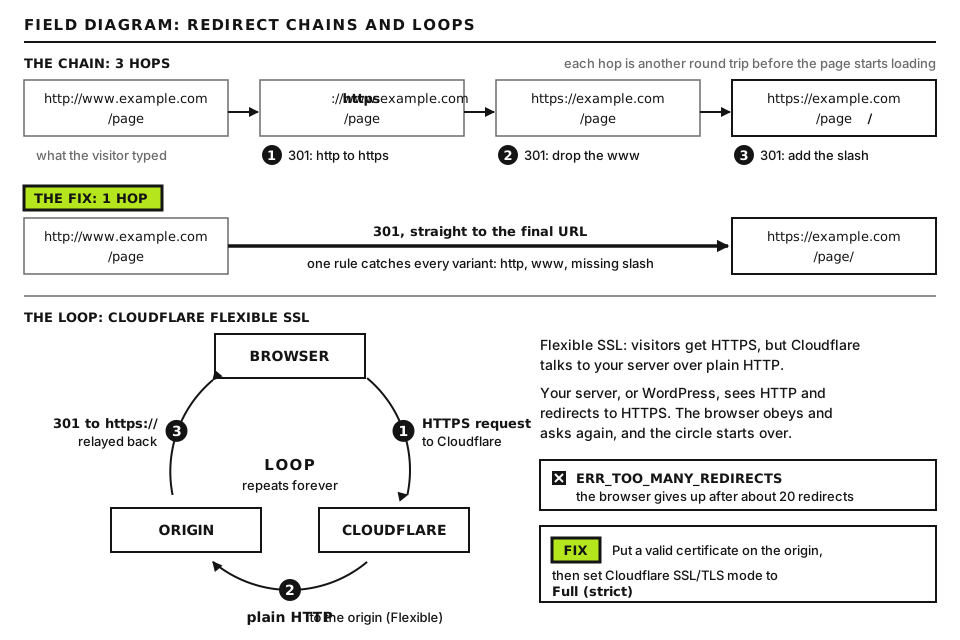
A request passes through the layers in a fixed order, and the first one that issues a redirect wins that hop. The browser then makes a fresh request to the new address, and the whole sequence starts again. A chain is simply several layers each making one “correction”.
Each hop usually comes from a different layer. Trace them one by one. Open full size
Redirect, RewriteRule [R=301], rules written by panels and plugins
Same as layer 3; found by reading the file
5
WordPress core
Canonical host and slash fixes, old slugs, guessed URLs, attachment pages
x-redirect-by: WordPress
6
Plugins and theme
Redirect managers, SEO, security, language, membership, maintenance plugins
x-redirect-by with a plugin’s name, WordPress, or nothing
The X-Redirect-By header is the most useful clue. Since WordPress 5.1, the core wp_redirect() function adds it, with the value WordPress unless the caller passes its own name. Many plugins identify themselves this way, though not all do, and code that sends a raw PHPheader() redirect skips it entirely.
If the chain ends on a spam or scam site, treat it as a hack and follow our guide to malicious redirects instead. A loop that never resolves is covered in FG-03. Choosing one canonical www or https form is covered in FG-39.
Before you start
Access you need: the WordPress dashboard, SFTP or SSH, and your CDN dashboard. A staging copy is ideal for disabling plugins one at a time.
Back up.htaccess and export your redirect plugin’s rules before removing anything.
How to run commands. Commands starting with curl run on your own computer: built in on macOS and Linux; on Windows use WSL, or curl.exe in PowerShell. Commands starting with wp or grep run over SSH in the site’s folder, the one containing wp-config.php; on some hosts WP-CLI is wp-cli. Blocks starting with <?php are file contents, not commands.
Test logged out. Some redirects only apply to visitors who are logged out (or logged in). curl is always logged out, which makes it a reliable baseline.
Replace example.com with your domain and PROBLEM-PATH with the address that misbehaves. The test parameter shows whether query strings survive; keep the quotes so your shell does not interpret the ?. -s hides progress, -I requests headers only, -L follows each redirect, and grep -i -E keeps only the lines that identify each hop. Example output for a two-hop chain:
This is sample output, where RAY_ID stands for Cloudflare’s request ID. Read it in blocks: each HTTP line starts a hop. The first hop has no x-redirect-by, so it came from the CDN or the server; the second came from WordPress and also dropped the query string. Good output is a single 200, or one 301 and then a 200. Some servers answer a HEAD request (what -I sends) differently from a normal page load; if the chain looks odd, repeat with curl -sL -o /dev/null -D - "URL", which makes ordinary requests and prints all headers (-D -).
In the browser
Open DevTools (F12), go to the Network tab, check Preserve log so earlier hops are kept, and load the URL. Each redirect appears as its own row with a 3xx status; click it and read Response Headers. If the status reads 301 Moved Permanently (from disk cache), your browser replayed a stored redirect without asking the server. If it reads 307 Internal Redirect with Non-Authoritative-Reason: HSTS, the browser upgraded to https on its own because of HSTS; that hop costs nothing and is not a server problem.
Step 2: Match each hop to its layer
Appears in the browser but not in curl: a cached redirect or HSTS. Test in a private window and clear cached files for the site.
Has CDN headers but no origin headers (for example no x-powered-by or cache plugin header that your other pages carry): the CDN issued it. Go to Step 6.
Has x-redirect-by: WordPress: core or a plugin calling wp_redirect() without naming itself. Go to Steps 3 and 4.
Has x-redirect-by with another name: that plugin or theme. Go to Step 4.
Has your server’s headers but no x-redirect-by: server config or .htaccess, or PHP code using a raw redirect. Go to Step 5, and if nothing turns up there, Step 4.
To check whether the CDN or your server sent a hop, bypass the CDN: curl -sI --resolve example.com:443:ORIGIN_IP https://example.com/PROBLEM-PATH, where ORIGIN_IP is your server’s IP address from the hosting panel. --resolve connects straight to that IP. If the redirect disappears, it lives at the CDN.
Step 3: WordPress core’s own redirects
WordPress redirects more than most people realize. All of these send x-redirect-by: WordPress.
Canonical redirects
The redirect_canonical function runs on every front-end request and “corrects” the address to WordPress’s preferred form. It fixes the host and scheme to match the home setting, turns ?p=POST_ID into the pretty permalink, removes /page/1/, and adds or removes the trailing slash to match your permalink structure. If your structure is /%postname%/ (ending in a slash), /contact becomes /contact/. A server or CDN rule that strips slashes then fights it, giving a chain or a loop. Decide on one slash style, set the permalink structure to match, and remove the opposing rule.
Real folders on Apache get a slash added by the server itself (the DirectorySlash setting of mod_dir), before WordPress runs, so /wp-admin to /wp-admin/ is normal.
Guessing a URL for a 404
When an address would otherwise 404, WordPress tries to guess what you meant by looking for a published post whose slug starts with the last part of the path. That is how a typo or a deleted page lands on an unrelated post. Since WordPress 5.5 you can control it with filters. To turn guessing off, create wp-content/mu-plugins/no-404-guessing.php:
No placeholders. Files in mu-plugins load automatically on every request and cannot be deactivated in the dashboard; create the folder if it does not exist. With this in place, unknown addresses return a proper 404. A gentler option is add_filter( 'strict_redirect_guess_404_permalink', '__return_true' );, which only redirects on an exact slug match.
Old slug redirects
When you change the slug of a published post or page, WordPress remembers the old one in a hidden custom field called _wp_old_slug and redirects it to the new address. For permalinks containing dates, it does the same for old dates with _wp_old_date. This is helpful until you want to reuse the old slug, or a page was renamed several times and now carries a list of forgotten redirects.
wp db query "SELECT post_id, meta_key, meta_value FROM TABLE_PREFIXpostmeta WHERE meta_key IN ('_wp_old_slug','_wp_old_date');"
TABLE_PREFIX is the value of $table_prefix in wp-config.php, often wp_, giving wp_postmeta. Output is a table of post IDs and their stored old slugs or dates. An old slug that matches the path you are tracing explains the redirect. To remove one:
wp post meta delete POST_ID _wp_old_slug OLD_SLUG
POST_ID is the number from the post_id column and OLD_SLUG is the exact value from meta_value. Naming the value deletes only that entry, since one post can have several. Good output is Success: Deleted custom field.
Attachment pages
Since WordPress 6.4, new installs have attachment pages switched off, and the attachment’s address redirects to the file itself. Older sites keep their attachment pages unless a plugin changes that. SEO plugins often add their own redirect for attachment URLs as well, so check their media settings if image links behave unexpectedly.
Step 4: Plugins and the theme
Plugins that commonly create redirects, often automatically:
Redirect managers: Redirection (Tools, Redirection) can monitor posts and create a redirect whenever a permalink changes. Rank Math’s Redirections module and Yoast SEO Premium’s redirect manager can do the same, and may offer to redirect deleted posts. Search each tool’s rule list for the path you traced.
Security plugins: custom login URLs that redirect wp-admin and wp-login.php, country blocking and bot challenges.
Language plugins: redirects based on the browser’s language, which makes the problem appear for some visitors and not others.
Shops, memberships and LMS plugins: redirects to login, account or cart pages for protected content.
Maintenance and coming soon plugins, and the theme’s functions.php, which can hook template_redirect.
Watch the query string, too. Redirection lets each rule exact-match, ignore or pass through query parameters; a rule set to ignore without passing will strip tracking parameters, as in the Step 1 example.
Find the plugin quickly
wp plugin list --status=active --fields=name,version
Type as shown. It lists active plugins by folder name. On staging, deactivate likely candidates one at a time with wp plugin deactivate PLUGIN_SLUG, where PLUGIN_SLUG is a name from that list, and rerun the Step 1 curl after each. The hop that disappears names the culprit. Reactivate with wp plugin activate PLUGIN_SLUG. To test the theme, temporarily switch to a default theme on staging with wp theme activate THEME_SLUG, using a slug from wp theme list.
The free Query Monitor plugin can also help: when a redirect happens while you are logged in as an administrator, it adds response headers containing the PHP call stack that triggered it, which you can read in the DevTools Network tab.
Run in the site folder. -n shows line numbers, -i ignores case, and -E lets | mean “or”. Good output shows only the standard WordPress block and rules you recognize. Look for duplicated https or www rules, rules for old URL structures, and blocks labeled by a hosting panel or plugin. A panel’s redirect tool often writes straight into this file. Rules above # BEGIN WordPress run before WordPress and win.
On Nginx, run nginx -T 2>/dev/null | grep -n -E "return 30|rewrite " as root to list every redirect in the loaded config. On managed hosting, some redirects (such as a forced https setting) live in the panel; look there before opening a ticket.
Step 6: The CDN layer
In Cloudflare, redirects can come from several places, and the ones at account level are easy to forget:
Rules in the domain’s dashboard: Single Redirects (also labeled Redirect Rules) and any remaining Page Rules with Forwarding URL.
Bulk Redirects, which are configured at the account level rather than in the domain and can apply to every domain in the account.
SSL/TLS, Edge Certificates: Always Use HTTPS, which redirects http to https on the same host.
Workers attached to routes on the domain, which can return any response they like.
Also purge the CDN cache after removing a redirect at the origin, since a cached 301 can keep being served from the edge.
Advanced: Log every WordPress redirect with its source
When a redirect has x-redirect-by: WordPress and you cannot tell which code sent it, make WordPress tell you. Create wp-content/mu-plugins/redirect-logger.php on staging (or briefly on live):
There are no placeholders. The wp_redirect filter runs every time any code calls wp_redirect(), and wp_debug_backtrace_summary(), a WordPress core function, returns the chain of functions that led there. The callback logs one line and returns the location unchanged, so behavior is not altered. Lines go to the PHP error log, or to wp-content/debug.log if WP_DEBUG and WP_DEBUG_LOG are on. A line might read REDIRECT 301 /contact -> https://example.com/contact-us/ via ..., redirect_canonical, wp_redirect, apply_filters('wp_redirect'), ..., naming core, or it might name a plugin class or function, which tells you exactly where to look. If the redirect you are chasing never appears in the log, it did not come from wp_redirect(): look at the server, the CDN or raw PHP header() calls. Delete the file when you are done, since it writes on every redirect.
Collapse the chain
Once every hop has an owner, fix it at the source rather than adding another rule on top. Point older redirects straight at the final address, remove duplicates so each job (https, host, slash, page moves) is done by exactly one layer, and keep that list written down. Then rerun the Step 1 trace: one hop at most, and the query string intact.
When to contact your host
Open a ticket if a hop has your server’s headers but no rule appears in .htaccess, the panel or WordPress, which usually means a server-level setting you cannot see. Send:
The full Step 1 curl output, with the time you ran it in UTC.
The --resolve test result showing whether the hop happens at the origin.
Any CDN ray IDs from the response headers.
Your .htaccess contents, and what you have already ruled out.
Did this fix it?
Still stuck? Start again from what you can see in the Emergency Room.
Still stuck?
Print a free one-page checklist to keep, or open the Emergency Room if the symptom does not match.
Moved a WordPress site and it keeps sending you to the old domain or staging address? Find which layer is redirecting, then fix the database URLs safely, constants, DNS and CDN origin.
Four versions of your address should reach one canonical URL in a single redirect. Test all four, set WordPress to match, then write one combined rule at the server or CDN.
Changed your URLs or domain? Build a complete old-to-new map, pick the right status code, put the rules in the right layer and test every line before and after launch.