How to Move Your DNS to Cloudflare Without Breaking Email or the Website
Most broken Cloudflare moves come from a record the import scan missed, a proxied mail hostname or DNSSEC left on. Audit, compare and switch in the right order.
You moved a domain to Cloudflare and now the site shows an error, or mail stopped arriving, or both. Common versions: This site can’t be reached, ERR_NAME_NOT_RESOLVED, a Cloudflare Error 1016 Origin DNS error, a contact form that stopped sending, or a mailbox that has been silent since the nameserver change. If you have not switched yet, good: this guide is also the safe order of operations.
Under the hood, changing nameservers swaps the entire phone book for your domain in one move. Anything that was in the old book but not in the new one stops existing on the internet. On top of that, Cloudflare can put its proxy in front of a record, which works only for web traffic, and DNSSEC can make resolvers reject the new answers outright. Freelancers and agencies see this most, because they often move a client domain without knowing every service that quietly depended on it.
What is happening
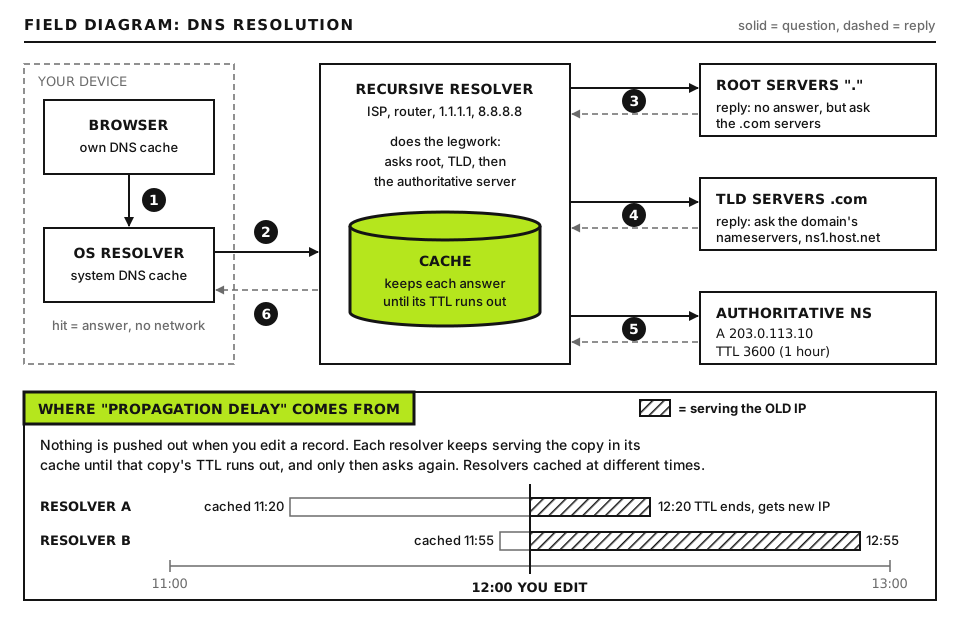
Your registrar tells the registry for your domain extension (for example the .com registry) which nameservers are authoritative. Resolvers around the world ask those nameservers for answers. When you switch to Cloudflare, the registry starts sending resolvers to two Cloudflare nameservers, and from then on only the records in your Cloudflare zone exist.
The TLD sends resolvers to whichever nameservers you set. Only records in that zone exist. Open full size
Three things go wrong in practice:
Missing records. Cloudflare’s onboarding scan (its docs call it the quick scan) is a best effort guess. It queries a predefined list of common names and types, because almost no DNS host allows a full zone transfer. A name it never thought to ask about is never copied.
Wrong proxy status. A proxied (orange cloud) record answers with Cloudflare IP addresses. That is fine for HTTP and HTTPS. Mail, FTP, SSH and most other protocols then try to talk to Cloudflare instead of your server and fail.
DNSSEC mismatch. If the registry still holds a DS record for your old DNS host’s signing key, validating resolvers expect signatures Cloudflare does not have. They return SERVFAIL, which looks like the domain vanished.
Record type
Can be proxied?
Typical correct setting
A / AAAA for example.com and www
Yes
Proxied, once SSL mode is right
A / AAAA / CNAME for mail, smtp, imap, pop, webmail on another host
Yes, but should not be
DNS only
A for ftp, ssh, a server hostname, a VPN
Yes, but should not be
DNS only
CNAMEs for domain verification, DKIM, autodiscover, SaaS tools
Some are, but should not be
DNS only
MX, TXT, SRV, CAA, NS
No
Always DNS only by design
Before you start
You need logins for three places: the registrar (where the domain is registered), the current DNS host (often the registrar, the web host’s panel, or the email provider) and your Cloudflare account. If the domain belongs to a client, confirm who owns the registrar account before changing anything.
Make a backup of the zone before you touch it. Most DNS hosts offer an export as a BIND zone file. If yours does not, the dig audit in Step 1 becomes your backup, so save its output to a dated file.
How to run the commands. Every command in this guide runs on your own computer, not on the server. On macOS and Linux, open Terminal; dig is built in on macOS and available on Linux through the dnsutils or bind-utils package. On Windows, install WSL and use the Linux commands, or use the PowerShell equivalent Resolve-DnsName shown in Step 1. None of this needs SSH access to the web server.
Step 1: Audit the zone you have now
The single most common cause of a broken move is a record that existed at the old DNS host and never made it into Cloudflare. Build a complete list before anything else.
Find the current authoritative nameservers
dig +short NS example.com
example.com is your domain. +short prints only the answer. Good output is two or more hostnames such as ns1.OLDHOST.net.. If the names already end in ns.cloudflare.com., the switch has happened and you are auditing after the fact; use the old nameserver names from your registrar’s history or the old host’s documentation in the next commands.
Ask the old nameservers directly for each record
for name in example.com www.example.com mail.example.com webmail.example.com autodiscover.example.com _dmarc.example.com; do
  for type in A AAAA CNAME MX TXT; do
    dig @OLD_NS +noall +answer "$name" "$type"
  done
done
OLD_NS is one of the hostnames from the previous command. The @ sends the question straight to that server, skipping your local resolver and its cache. +noall +answer hides everything except the answer section. Each output line shows the name, the TTL in seconds, the class, the type and the value. A name that returns nothing simply has no record of that type, which is normal.
Extend the list of names with everything you know about: the blog, the shop, staging, a client portal, cpanel, ftp, a status page. Ask the client, and check the web host’s panel, which lists the subdomains it created.
Hunt for the records the scan cannot guess
These are the usual blind spots, and they are almost all email related:
DKIM selectors. DKIM keys live at SELECTOR._domainkey.example.com, and the selector can be any word. Google Workspace uses google by default, Microsoft 365 uses selector1 and selector2, and newsletter and transactional mail services use their own. Find the real selectors in each sending service’s admin screen, or open a recent email from the domain, view the original message and read the s= value in the DKIM-Signature header.
SRV records. Names such as _autodiscover._tcp.example.com, _sip._tls.example.com or _submission._tcp.example.com start with underscores and are rarely in any scan list.
Verification TXT records for search consoles, Microsoft 365, Apple, payment processors and SSO tools, usually at the apex or at an underscore name.
Deep subdomains such as shop.eu.example.com, and anything a previous developer added years ago.
CAA records, which control which certificate authorities may issue for the domain.
SELECTOR is the DKIM selector you found in the email header or the sender’s admin screen. A good DKIM answer is either a long TXT value starting v=DKIM1; or a CNAME pointing at the email provider. An empty answer for a selector you know is in use means you have the wrong selector or the old zone is already broken.
On Windows PowerShell, the equivalent is Resolve-DnsName -Name example.com -Type MX -Server OLD_NS, where -Type sets the record type and -Server sends the query to that nameserver.
Prefer a zone file import over the scan
If the old host gives you a zone file, import it in Cloudflare under DNS, Records, then the import and export option. Cloudflare’s own docs recommend a zone file when you want control over what is imported. Remove the old host’s NS and SOA lines from the file first, because Cloudflare manages its own.
Step 2: Compare the two zones before switching nameservers
When you add a domain, Cloudflare shows you two nameservers assigned to your account, in the form NAME.ns.cloudflare.com. Those servers will already answer for your zone even though the world is not using them yet. That lets you test the new zone before it goes live.
for name in example.com www.example.com mail.example.com SELECTOR._domainkey.example.com; do
  for type in A AAAA CNAME MX TXT; do
    old=$(dig @OLD_NS +short "$name" "$type" | sort)
    new=$(dig @CF_NS +short "$name" "$type" | sort)
    [ "$old" != "$new" ] && echo "DIFF $name $type | old: $old | new: $new"
  done
done
OLD_NS is a current nameserver and CF_NS is one of the two Cloudflare nameservers shown in your dashboard. The loop prints a line only when the answers differ. Silence is the result you want.
Expect two legitimate differences. Proxied A and AAAA records will return Cloudflare addresses instead of your server’s, and a proxied CNAME is flattened into Cloudflare addresses. Every other difference, especially on MX, TXT or any mail hostname, is a record you must fix in Cloudflare before switching.
Step 3: Decide proxied or DNS only, record by record
Only A, AAAA and CNAME records have a proxy toggle. The rule is simple: proxy only hostnames that serve websites over HTTP or HTTPS. Everything else is DNS only.
Never proxy anything mail touches
Look at your MX records. Each one points at a hostname. If that hostname is in your own zone, for example mail.example.com, its A record must be DNS only. Mail servers connect on port 25, and Cloudflare’s standard proxy does not carry it.
The nasty case is an MX that points at the bare domain itself (example.com MX 0 example.com), which some panels create. The moment you proxy the apex for the website, mail breaks. Fix it by creating mail.example.com as a DNS only A record to the mail server’s IP and changing the MX to point at it.
Never proxy FTP, SSH or server hostnames
SFTP on port 22 and FTP on port 21 will time out through the proxy. The same goes for the server’s own hostname, database ports and anything a developer connects to directly. Cloudflare’s HTTPS proxy does listen on a short list of extra ports, which is why some control panel URLs still work proxied, but test them rather than assume.
A side effect worth knowing: a DNS only record pointing at the same server as your proxied site reveals the server’s real IP to anyone who looks. If hiding the origin matters, put mail on a separate host.
Watch SPF when you proxy the website
If your SPF record authorizes the web server with a or a:example.com, proxying the apex silently changes what that mechanism resolves to: it now returns Cloudflare addresses, and mail sent by WordPress from your server starts failing SPF. Replace it with the server’s real outgoing address.
This is a TXT record value you edit in Cloudflare. SERVER_IPV4 is the address your web server sends mail from (your host can confirm it, or read it from a received message header). MAIL_PROVIDER_SPF is your mailbox provider’s include domain from its setup guide. Keep exactly one record starting v=spf1. Deliverability in depth is covered in our other email guides; here you only need SPF to survive the move.
Step 4: Set SSL to Full (strict) before you proxy
When a record is proxied, there are two connections: browser to Cloudflare, and Cloudflare to your server. The encryption mode, under SSL/TLS in the Cloudflare dashboard, controls the second one. Cloudflare may preselect an automatic mode for new zones; choose a custom mode explicitly so you know what you have.
Mode
Cloudflare to origin
Verdict
Flexible
Plain HTTP
Causes redirect loops with WordPress sites that force HTTPS
Full
HTTPS, certificate not validated
Works, but accepts any certificate
Full (strict)
HTTPS, certificate must be valid for the hostname
The one you want
Confirm the origin has a valid certificate first, from your computer:
SERVER_IP is your web server’s IP address, from the old A record. --resolve forces curl to connect to that IP for that hostname, bypassing DNS and Cloudflare. -s hides the progress bar and -I fetches headers only. Good output starts with HTTP/2 200 or HTTP/1.1 200 (or a 301 to your canonical URL). A certificate error means the origin certificate is missing or expired: fix that with your host before proxying, or use a Cloudflare Origin Certificate on the server. Redirect loops after a move are covered in our ERR_TOO_MANY_REDIRECTS guide, and Cloudflare 52x errors in our Cloudflare errors guide.
Step 5: Lower TTLs, then change nameservers
A day or more before the switch, lower the TTL on the important records at the old host to 300 seconds. If you have to roll back, resolvers will forget the old answers quickly. Wait at least as long as the old TTL before switching, because caches still hold the old value until it expires.
Know what lowering TTLs cannot do. The nameserver delegation itself is cached according to the TTL the registry publishes, not yours. Check it:
dig +norecurse @a.gtld-servers.net example.com NS
This asks a .com registry server directly. +norecurse tells it not to look anything up on your behalf. The answer appears in the authority section with a TTL; for .com it is commonly 172800 seconds (two days). For other extensions, list the registry servers with dig +short NS TLD, where TLD is your extension without the dot (for example org), and query one of them instead. That long TTL is why some visitors keep using the old nameservers for a while: leave the old zone in place and unchanged for at least a few days.
Now change the nameservers at the registrar to the two Cloudflare names, exactly as shown in your dashboard. Remove all the old ones. Cloudflare checks periodically and marks the zone active once it sees the change.
Step 6: DNSSEC in the right order
This step turns a careful move into an outage more often than any other. Check whether DNSSEC is on:
dig +short DS example.com
Any output (a line of numbers and a long hex string) means the registry holds a DS record and DNSSEC is active. Empty output means it is off and you can skip ahead.
If it is on, follow this order:
At the registrar, turn off DNSSEC or delete the DS record, before you change nameservers.
Wait until the old DS record has expired from caches. Check its TTL with dig DS example.com +noall +answer; Cloudflare’s guidance suggests waiting at least a day.
Change the nameservers to Cloudflare and wait until the zone is active.
In Cloudflare, go to DNS, Settings and enable DNSSEC. Cloudflare shows the DS values (key tag, algorithm, digest type and digest).
Add that DS record at the registrar. Some registrars pick it up automatically; most need it pasted in.
dig +dnssec example.com A @1.1.1.1
This asks Cloudflare’s public resolver, which validates DNSSEC. +dnssec requests signatures. Good output shows status: NOERROR and the ad flag in the flags line, meaning the answer was validated. status: SERVFAIL means a DNSSEC mismatch: remove the DS at the registrar and start this step again. If the domain has gone completely dark because of DNSSEC, our domain expired and DNSSEC guide covers recovery.
Step 7: Verify after the switch
Run the Step 2 comparison again, this time against a public resolver and Cloudflare, and send real tests:
Load the site in a private window and check the response headers in browser devtools (Network tab, click the document request). A proxied site shows server: cloudflare and a cf-ray header.
Send an email from an outside account to a mailbox on the domain, and reply from it.
Submit the website’s contact form and confirm delivery.
Open the original of a message sent from the domain and confirm spf=pass and dkim=pass.
Connect by SFTP and to webmail.
You can also use our diagnostic tools to check records from outside your network.
Advanced: Building a complete inventory without a zone transfer
When the old DNS host will not export a zone and the client cannot tell you what exists, combine several sources:
Certificate Transparency logs. Every publicly trusted certificate is logged with its hostnames. Searching crt.sh for %.example.com lists subdomains that have ever had a certificate, which surfaces forgotten staging, shop and portal names.
Mail headers. Received messages from each system that sends as the domain (newsletters, CRM, invoicing, helpdesk) reveal DKIM selectors and return path domains that need records.
The web host panel. Its DNS editor or zone list often contains records the panel created automatically, such as autoconfig, cpcalendars or webdisk names.
Third party dashboards. Each SaaS tool that asked you to verify a domain lists the record it expects.
Then check whether the old host uses a wildcard, which would make any name appear to exist:
dig @OLD_NS +short RANDOMSTRING.example.com A
RANDOMSTRING is any made up label nobody would use. An empty answer means there is no wildcard. An IP address means *.example.com exists at the old host, and you must recreate it in Cloudflare or subdomains you never knew about will stop resolving.
Finally, before the switch, verify Cloudflare’s current screens and limits at developers.cloudflare.com, in particular the full setup, proxy status, DNSSEC and SSL/TLS encryption mode pages, because dashboard labels change over time.
When to contact your host
If the site or mail is still broken after the records match, open a ticket with your web host or mail provider and include:
The exact time of the nameserver change, in UTC.
The old and new nameservers.
Output of the Step 2 comparison and of dig +short MX example.com against a public resolver.
For web problems: the URL, the full response headers and the cf-ray value from any Cloudflare error page.
For mail problems: a bounce message with its full headers, and the sending address and time.
Which records you set to proxied and which to DNS only.
Hosts can see firewall blocks, rate limits on Cloudflare IP ranges and mail routing settings on the server that you cannot. If the site is down right now and you need a calm checklist, start at our Emergency Room.
Did this fix it?
Still stuck? Start again from what you can see in the Emergency Room.
Still stuck?
Print a free one-page checklist to keep, or open the Emergency Room if the symptom does not match.
A registrar transfer moves the registration, not your website or mail. Downtime comes from DNS hosted at the old registrar. Secure the zone first, then transfer.
Your designer went quiet, closed their business or will not hand over the domain or hosting. Find out what you already control, prove you are the registrant, recover accounts in your own name, and rebuild access for anything you cannot get back.
The browser could not turn your domain into an IP address. Check the domain status in RDAP, then nameservers, records, glue and DNSSEC, then your own DNS cache.