How to Fix DNS_PROBE_FINISHED_NXDOMAIN, an Expired Domain or “This Site Can’t Be Reached”
The browser could not turn your domain into an IP address. Check the domain status in RDAP, then nameservers, records, glue and DNSSEC, then your own DNS cache.
Chrome shows This site can’t be reached with DNS_PROBE_FINISHED_NXDOMAIN or ERR_NAME_NOT_RESOLVED. Firefox says Hmm. We’re having trouble finding that site. Safari says Safari Can’t Find the Server. Email to the domain often bounces at the same time, because mail also depends on DNS.
Every visit begins with a DNS lookup that turns your domain name into an IP address. These errors mean that lookup failed: either DNS answered “this name does not exist” (NXDOMAIN) or it could not produce a trustworthy answer at all. The usual reasons are an expired or suspended domain, nameservers changed at the registrar, a missing record, missing glue, or DNSSEC that no longer matches. Sometimes it is only a stale cache on your own computer.
What is happening
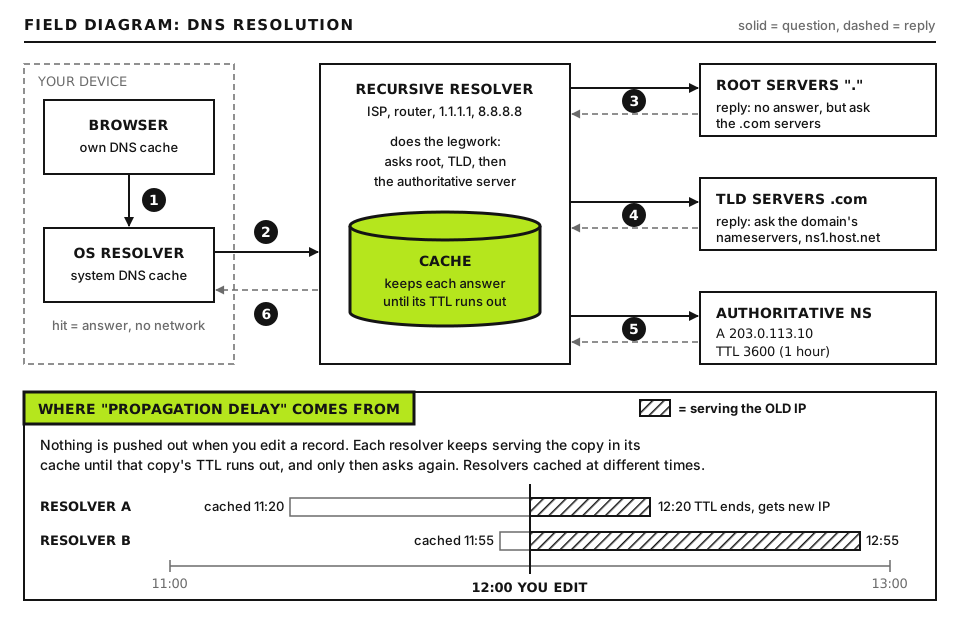
A resolver (your ISP’s, your router’s, or a public one such as 1.1.1.1) finds your domain in steps. It asks the root servers where the TLD lives (for example .com), asks the TLD registry which nameservers handle your domain (the delegation, set at your registrar), then asks those nameservers for the A or AAAA record. If DNSSEC is enabled, it also checks signatures at each step.
A lookup walks from the root to the TLD to your nameservers. A break at any step means no answer. Open full size
Where it breaks
What the resolver returns
Typical cause
The registry has no delegation
NXDOMAIN
Domain expired, on hold, deleted or never registered
Delegated nameservers do not answer or do not know the zone
Nameservers changed to a provider where the zone was never created, missing glue
Zone exists, record missing
NOERROR with no answer, or NXDOMAIN for a subdomain
A record deleted, www never created
DNSSEC chain broken
SERVFAIL from validating resolvers only
DS record at the registrar no longer matches the DNS provider’s keys
Your device
Old cached failure
Local, browser or router cache, hosts file entry, VPN or filtering DNS
The difference between NXDOMAIN and SERVFAIL is the most useful clue in this guide. NXDOMAIN means an authority said the name does not exist. SERVFAIL means the resolver could not get a valid answer.
Before you start
Access you need: your domain registrar account (where you pay for the domain), your DNS provider account if it is different (often your host or Cloudflare), and your hosting panel for the server IP.
Backups: export or screenshot your DNS zone before changing anything. Many providers offer a zone file export.
How to run commands: almost everything here runs on your own computer. dig and whois are built into macOS and most Linux systems (on Debian and Ubuntu, dig and delv come from the bind9-dnsutils or dnsutils package). On Windows, install WSL and run them there, or use PowerShell’s Resolve-DnsName, shown where it applies. curl is built into macOS, Linux and Windows 10 and 11 (as curl.exe).
Step 1: Is it just you?
dig example.com A +short
dig @1.1.1.1 example.com A +short
dig @8.8.8.8 example.com A +short
Run these on your computer. Replace example.com with your domain. A asks for the IPv4 address, @1.1.1.1 and @8.8.8.8 send the question to Cloudflare’s and Google’s public resolvers instead of your default one, and +short prints only the answer. Good output is your server’s IP (or Cloudflare IPs if you proxy through Cloudflare) from all three. If the public resolvers answer but your default one does not, the problem is local; skip to Step 7. If all three return nothing, the problem is global; continue.
In PowerShell the equivalent is Resolve-DnsName example.com -Server 1.1.1.1. To see the error type, drop +short and read the status: field in the header, which says NOERROR, NXDOMAIN or SERVFAIL.
Step 2: Check whether the domain expired or is on hold
Run these on your computer. RDAP is the modern, structured replacement for WHOIS. rdap.org redirects your query to the right registry’s RDAP server; -L follows that redirect and -s hides progress. The output is JSON; look for the status array and the events list, where eventActionexpiration gives the expiry date. whois gives the same information as text: look for Registry Expiry Date and Domain Status lines. You can also use the web tool at lookup.icann.org. Some country code TLDs do not offer RDAP; use the registry’s own WHOIS site for those.
What the status codes mean
Statuses come from the registry protocol (EPP). WHOIS shows them in camel case, such as clientHold; RDAP shows them as words, such as client hold. A domain can carry several at once.
Status
Who set it
Does it resolve?
What to do
ok, clientTransferProhibited
Normal
Yes
Nothing; transfer lock is a normal protection. Look elsewhere.
autoRenewPeriod
Registry, after expiry
Usually, but the registrar may park it
Renew at the registrar now, at the normal price
clientHold
Your registrar
No
Usually unpaid renewal, an unverified registrant email, or an abuse or legal action. Renew or verify, then ask the registrar to lift it.
serverHold
The registry
No
Registry action, often for abuse, legal reasons or registry policy. Contact your registrar, who must deal with the registry.
redemptionPeriod
Registry, after the registrar deleted the name
No
Can still be restored through your registrar, usually for a restore fee on top of renewal. Act immediately.
pendingRestore
Registry
No
A restore is in progress; wait for it to complete
pendingDelete
Registry
No
Usually cannot be restored. The name will be released for anyone to register.
inactive
Registry
No
No nameservers are set. Add them at the registrar (Step 3).
Renewal and grace periods
For generic TLDs such as .com, .net and .org, the usual sequence after the expiry date is:
Auto-renew grace period: the registrar may keep the domain for a while after expiry. ICANN describes this window as lasting anywhere up to 45 days, and the actual length depends on your registrar’s terms. Under ICANN’s Expired Registration Recovery Policy, the registrar must still let you renew for a time after expiry, and it interrupts the domain’s DNS (often with a parking page) before deleting it, so owners notice. That interruption is often the first time people realize.
Redemption grace period: once the registrar deletes the name, gTLD registries hold it for 30 days in redemptionPeriod. Only the previous registrant can restore it, through the registrar, and restores normally cost more than a renewal.
Pending delete: commonly about five days, after which the name drops and can be registered by anyone, including people who buy expiring domains.
Country code TLDs (.uk, .de, .io and others) set their own rules, and some have no redemption period at all. Check your registrar’s renewal policy page for the exact timings on your extension.
After renewing or restoring, the registry republishes the delegation. That is usually quick, but resolvers that cached the NXDOMAIN keep it until the negative cache time runs out (see the Advanced section). If the name was parked, the registrar may also have changed your nameservers to its parking servers; check them in Step 3.
Run these on your computer. The first asks DNS which nameservers serve the domain; the second shows the nameservers registered at the registry. Good output: both lists match, and they are the nameservers of the provider where your zone and records actually live (your host, Cloudflare, or another DNS service). Bad output: the lists differ, one is empty, or they point at a provider where you never created the zone, at the registrar’s parking servers, or at an old host you left.
Common causes
A domain transfer reset the nameservers to the new registrar’s defaults.
You moved hosts and changed nameservers, but the old host held your zone and the new one does not have it yet.
You signed up for Cloudflare but the zone was never activated, or you removed the site from Cloudflare while the registrar still points at Cloudflare’s nameservers.
An old host closed your account and deleted the zone.
Ask a nameserver directly
dig @NAMESERVER example.com SOA
dig @NAMESERVER example.com A
Run these on your computer. NAMESERVER is one of the names from the NS lookup, such as the first nameserver listed. Good output has status: NOERROR, an SOA record and an aa (authoritative answer) flag in the header. status: REFUSED or SERVFAIL means that server does not hold your zone: create the zone there, or change the nameservers at the registrar to the provider that does.
Change nameservers at your registrar, in the domain’s DNS or nameserver settings. Changes at the registry usually appear within minutes to hours, but resolvers that cached the old NS records keep them until their TTL expires, which for the TLD delegation can be up to a day or two.
Step 4: Check the A, AAAA and CNAME records
dig example.com A
dig www.example.com A
dig example.com AAAA +short
Run these on your computer. Good output has status: NOERROR and an ANSWER section with your server’s IP for both the bare domain and www. status: NOERROR with no answer section means the zone exists but the record does not. NXDOMAIN for www alone means the www record was never created. An AAAA (IPv6) record pointing to an address your server does not use can break the site for IPv6 visitors only; remove it if your host does not support IPv6.
Add or fix the records in your DNS provider’s zone editor: an A record for the bare domain (often written @) pointing at SERVER_IP, the server IP from your hosting panel, and either an A record or a CNAME for www. A bare domain cannot be a normal CNAME, though some providers offer CNAME flattening or ALIAS records for that case.
Step 5: Check glue records
If your nameservers live inside your own domain, for example ns1.example.com serving example.com, resolvers face a chicken and egg problem: to find ns1.example.com they need example.com, which is what they are trying to find. Glue records solve this. The registry publishes the nameserver IP addresses alongside the delegation.
dig +norec @TLD_SERVER example.com NS
Run this on your computer. TLD_SERVER is one of the TLD’s own nameservers; for .com and .net you can use a.gtld-servers.net, and for other TLDs find one with dig TLD NS +short, where TLD is your extension without the dot. +norec asks the server to answer from its own data without recursion. Good output: the AUTHORITY section lists your nameservers and, if they are inside your domain, the ADDITIONAL section lists their IPs. If in-domain nameservers have no IPs in ADDITIONAL, glue is missing; if the IPs are old, glue is stale. Fix it at the registrar, under a setting usually called “host records”, “child nameservers”, “register nameservers” or “glue records”.
Step 6: Check DNSSEC
DNSSEC signs DNS records so resolvers can detect forgery. The registrar publishes a DS record in the parent zone that must match a key (DNSKEY) in your zone. If you move DNS to a new provider and leave the old DS record at the registrar, validating resolvers see signatures that do not match and refuse to answer. The site then fails for users of validating resolvers, such as 1.1.1.1, 8.8.8.8 and many ISPs, while others still reach it.
Confirm it
dig @8.8.8.8 example.com A
dig @8.8.8.8 example.com A +cd
Run these on your computer. +cd sets the “checking disabled” flag, which asks the resolver to skip DNSSEC validation. If the first query returns status: SERVFAIL and the second returns your IP with NOERROR, DNSSEC is the cause. Newer versions of dig may also print an extended error line such as EDE: 9 (DNSKEY Missing) or EDE: 6 (DNSSEC Bogus), which names the exact problem.
Run these on your computer. The first shows the DS records the registry publishes; the first number in each line is the key tag. The second shows your zone’s keys; +multi prints each key with a comment such as key id = KEY_TAG, where KEY_TAG is that key’s number. Good output: a DS key tag matches the key id of the key marked as a KSK (flags 257), and the third query returns RRSIG records alongside your A record. Bad output: DS records exist but no DNSKEY is returned (the new provider does not sign the zone), or the key tags do not match.
delv example.com A
Run this on your computer. delv performs DNSSEC validation itself and explains the result. Good output ends with ; fully validated, or ; unsigned answer for a domain without DNSSEC. Bad output includes resolution failed, no valid RRSIG or broken trust chain, which confirms the chain is broken. Add +vtrace to see each validation step. The free web tool DNSViz draws the whole chain if you prefer a picture.
Fix it
Fastest fix: remove the DS record at the registrar (often a setting called DNSSEC with an option to disable). Resolvers stop validating once the old DS record expires from their caches, which can take hours.
Then re-enable properly: turn on DNSSEC at the new DNS provider, copy the DS values it gives you into the registrar, and confirm with delv.
Next time: disable DNSSEC at the registrar first, wait for the DS TTL to pass, move DNS, then re-enable with the new provider’s DS.
Step 7: Clear local DNS caches
If public resolvers answer correctly but your browser still fails, a cache or setting on your side is holding the old answer.
Where
Command or action
Windows (Command Prompt or PowerShell as administrator)
Open chrome://net-internals/#dns (or edge://net-internals/#dns) and click Clear host cache; then on the Sockets page click Flush socket pools
Firefox
Open about:networking#dns and click Clear DNS Cache
Router
Restart it, since many routers cache DNS
On Windows, a good result is Successfully flushed the DNS Resolver Cache. The macOS command prints nothing when it works and asks for your password. Also check your hosts file (/etc/hosts, or C:\Windows\System32\drivers\etc\hosts on Windows) for an old line with your domain, and try with any VPN, ad blocker DNS or secure DNS setting turned off.
Advanced: Reading a full resolution trace
dig +trace example.com A
Run this on your computer. +trace makes dig follow the chain itself, from the root servers down, instead of asking a resolver. The output comes in blocks, each ending with a line like ;; Received N bytes from SERVER_ADDRESS(SERVER_NAME) in N ms. Read them in order:
Root block: NS records for ., the root servers. If this fails, your network is blocking DNS.
TLD block: NS records for your TLD, returned by a root server.
Delegation block: NS records for example.com, returned by a TLD server, with DS records if DNSSEC is on. If this block is missing and the TLD server returns an SOA for the TLD instead, the registry has no delegation: the domain is expired, on hold or not registered.
Answer block: your A record, returned by your own nameserver. If the trace stops after the delegation with timeouts, your nameservers are down or unreachable; if it returns an SOA with no A record, the record is missing.
Negative caching
Resolvers also cache “does not exist” answers. How long they keep an NXDOMAIN is set by the zone’s SOA record (the smaller of the SOA TTL and its last field, the minimum). That is why a domain can stay broken for some visitors after you renew it or add a record. Check it with dig example.com SOA +noall +answer; the final number on the line is the negative cache time in seconds. You cannot flush other people’s resolvers, but Cloudflare and Google both offer public cache purge pages for their resolvers.
Watching propagation
To see whether resolvers around the world have the new answer, query several public resolvers with dig as in Step 1, or use a web propagation checker. Remember that different results are normal for up to the old record’s TTL; lowering TTLs a day before planned DNS changes keeps the switch short.
When to contact your registrar or host
Contact your registrar for anything about the registration: expiry, renewal, holds, redemption restores, nameserver changes that will not save, glue records and DS records. Contact your host or DNS provider when the delegation is correct but their nameservers do not answer or the zone is missing. Include:
The domain name and the exact status codes from RDAP or WHOIS.
The expiry date and whether you have renewed, with the order or invoice reference.
Output of dig example.com NS, dig @NAMESERVER example.com SOA and, for DNSSEC issues, dig example.com DS +short and the delv result.
UTC time when the site stopped resolving, and what changed: a transfer, a host move, a DNS provider change, a missed payment.
Our diagnostic tools can run DNS lookups from outside your network. If the domain controls a live business site and email, start with the Emergency Room checklist while you wait for the registrar.
Did this fix it?
Still stuck? Start again from what you can see in the Emergency Room.
Still stuck?
Print a free one-page checklist to keep, or open the Emergency Room if the symptom does not match.
Most broken Cloudflare moves come from a record the import scan missed, a proxied mail hostname or DNSSEC left on. Audit, compare and switch in the right order.
A registrar transfer moves the registration, not your website or mail. Downtime comes from DNS hosted at the old registrar. Secure the zone first, then transfer.
Web records point at the web host and mail records point at the mail provider. Mail breaks when a new host replaces the zone, or its server still thinks it handles your mail.