How to Fix Cloudflare Errors 520, 521, 522, 523, 524, 525 and 526
Cloudflare is up, but it could not get a good answer from your server. Each code names a different failure. Test the origin directly, then fix firewall, SSL or timeout.
Instead of your site you get a Cloudflare page with a big number: Error 520: Web server is returning an unknown error, Error 521: Web server is down, Error 522: Connection timed out, Error 523: Origin is unreachable, Error 524: A timeout occurred, Error 525: SSL handshake failed or Error 526: Invalid SSL certificate. Below it is a diagram showing You, Cloudflare and Host, with one marked as working and one as the problem.
Cloudflare sits between your visitors and your web server (called the origin). These 52x codes mean Cloudflare itself is fine but its connection to your origin failed in a specific way. That is good news: the code tells you which way, so you can go straight to the cause. Site owners usually meet these right after moving hosts, tightening a server firewall, or changing SSL settings.
What is happening
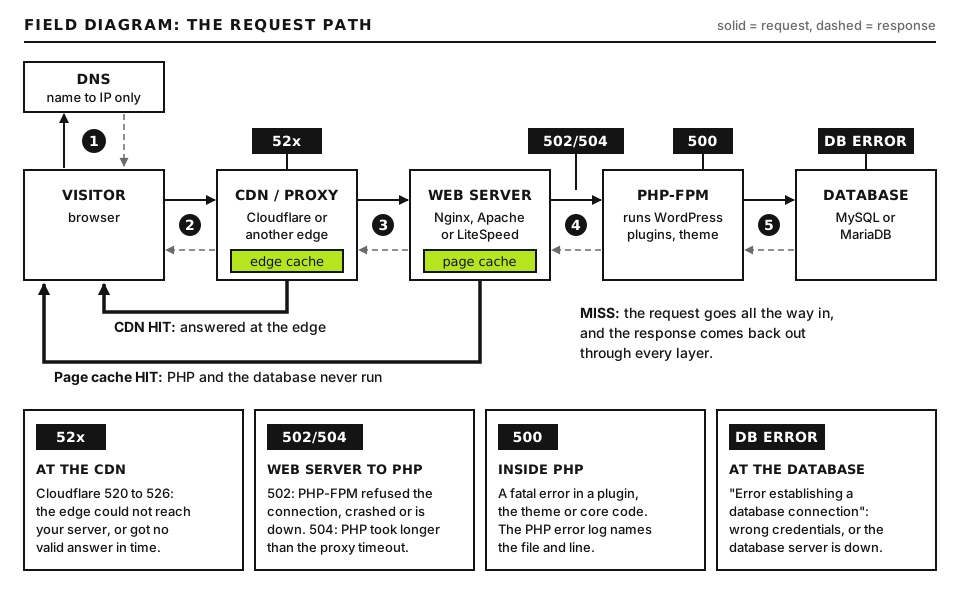
For each request, Cloudflare opens a TCP connection to your origin IP, performs a TLS handshake if it connects over HTTPS, sends the HTTP request and waits for the response. Each code marks the stage where that broke.
52x errors mean Cloudflare could not get a good answer from your origin. Open full size
Code
Stage that failed
Most common causes
520
Connected, but the response was empty, malformed or cut off
PHP or the web server crashed mid response, very large response headers (often too many cookies), the origin reset the connection
521
TCP connection actively refused
Web server stopped, or a firewall rejecting Cloudflare IPs
522
TCP connection timed out, no reply at all
Firewall silently dropping Cloudflare IPs, origin overloaded, wrong origin IP in DNS
523
Cloudflare could not find a route to the origin
Origin IP wrong or no longer exists, a CNAME target that does not resolve, network routing problem
524
Connected and sent the request, but no HTTP response within the timeout
Slow PHP requests, imports, reports or backups that run longer than about 125 seconds (Cloudflare’s default)
525
TLS handshake between Cloudflare and origin failed
No certificate on port 443, port 443 serving plain HTTP, missing SNI configuration, no shared cipher
A 530 page usually comes with a 1xxx error number, which is the real message (see Step 7). If a different gateway error appears on a plain nginx or Varnish page, it came from your server, not Cloudflare; our 502 and 504 guide covers those.
Before you start
Access you need: your Cloudflare dashboard, your hosting panel (to find the server IP and logs), and SSH if you manage the server.
Find your origin IP: it is in your hosting panel (often called the shared IP, dedicated IP or server IP). You cannot get it from a normal DNS lookup, because Cloudflare answers with its own addresses.
Backups: note your current Cloudflare SSL mode and DNS records before changing them.
How to run commands:curl, dig and openssl run on your own computer. macOS and Linux include them. On Windows, use WSL for the full set, or curl.exe in PowerShell (included in Windows 10 and 11). Server commands run in an SSH terminal; WordPress commands run in the site folder with wp, or wp-cli on some hosts.
Step 1: Get the Ray ID and read the diagram
Every Cloudflare error page shows a Cloudflare Ray ID at the bottom, plus your IP. The Ray ID identifies that exact request in Cloudflare’s logs. It ends with a three letter code for the Cloudflare data center that served it. The same value is in the cf-ray response header of every proxied response, which you can see in the browser’s devtools, Network tab, by clicking the request and reading Response Headers.
curl -s https://example.com/cdn-cgi/trace
Run this on your computer, replacing example.com with your domain. Cloudflare answers this path itself, without asking your origin. Good output is a short list including colo= (the data center), ip= (your IP as Cloudflare sees it) and http=. If this works while your pages fail, Cloudflare is reachable and the problem is behind it. If even this fails, the domain is not pointed at Cloudflare or your own connection is the problem.
Step 2: Test the origin directly, bypassing Cloudflare
This single test separates server problems from Cloudflare configuration problems.
Run these on your computer. example.com is your domain and ORIGIN_IP is the server IP from your hosting panel. --resolve host:port:address makes curl connect to that IP while still sending the right hostname and SNI, exactly as Cloudflare would. -v shows the connection, TLS handshake and headers; -s hides the progress bar; -o /dev/null discards the page body (use -o NUL in PowerShell with curl.exe).
How to read the result:
Connected to example.com (ORIGIN_IP) port 443, then a TLS handshake and HTTP/1.1 200 or HTTP/2 200: your origin works from your network. Suspect the origin firewall blocking Cloudflare specifically, or a Cloudflare setting.
Connection refused: nothing is listening, matching a 521. The web server is down, or a firewall rejects the port.
A long hang, then Connection timed out: matching a 522. Packets are being dropped, or the IP is wrong.
SSL certificate problem or no alternative certificate subject name matches: the certificate will fail Full (strict), matching a 526.
wrong version number or a handshake failure: port 443 is not speaking TLS for this hostname, matching a 525.
A response that only arrives after about 125 seconds or more: matching a 524.
With a hosts file
To browse the site normally while bypassing Cloudflare, add a line to your computer’s hosts file: ORIGIN_IP example.com and another for www.example.com. On macOS and Linux the file is /etc/hosts (edit it with sudo nano /etc/hosts); on Windows it is C:\Windows\System32\drivers\etc\hosts, opened in Notepad run as administrator. Remove the lines when you are done, or you will keep bypassing Cloudflare and be confused later.
By pausing Cloudflare
In the dashboard you can set the DNS record to “DNS only” (gray cloud) or use “Pause Cloudflare on Site” (at the time of writing, under Advanced Actions on the domain’s Overview page). This sends all visitors directly to the origin and exposes its IP, so treat it as a short test, not a fix.
Step 3: Fix 521 and 522 (firewall and server down)
Confirm the web server is running
sudo systemctl status nginx
sudo systemctl status apache2
sudo ss -ltnp | grep -E ':80 |:443 '
Run these on the server over SSH (on RHEL family systems Apache is httpd). ss -ltnp lists listening TCP ports with the owning process. Good output shows active (running) and listeners on ports 80 and 443. If nothing listens on 443 and your SSL mode is Full or Full (strict), Cloudflare cannot connect over HTTPS.
Allowlist Cloudflare IP ranges
Server firewalls and intrusion tools (CSF, fail2ban, Imunify360, ModSecurity with IP blocking) see thousands of requests arriving from a few Cloudflare addresses and sometimes block them as an attack. Cloudflare publishes its ranges at https://www.cloudflare.com/ips/, with plain text lists at https://www.cloudflare.com/ips-v4 and https://www.cloudflare.com/ips-v6.
for range in $(curl -s https://www.cloudflare.com/ips-v4) $(curl -s https://www.cloudflare.com/ips-v6); do
  sudo ufw allow proto tcp from "$range" to any port 80,443
done
Run this on the server over SSH, only if the server uses ufw (check with sudo ufw status). It downloads both lists and adds an allow rule for ports 80 and 443 for each range. There are no placeholders. Good output is Rule added for each range. For CSF, add each range to /etc/csf/csf.allow (and csf.ignore so the login failure daemon ignores them) and run sudo csf -r. On shared hosting, open a ticket asking the host to allowlist Cloudflare and check whether its firewall blocked any Cloudflare IPs.
Check DNS points at the right origin
In Cloudflare, DNS, Records, confirm the proxied A record for your domain contains the current server IP. After a host migration this is the most common 522 and 523 cause: the record still points at the old server. Compare it with the IP in your new hosting panel.
Step 4: Fix 520 (bad or empty response)
A 520 means the origin answered, but not with something Cloudflare can pass on. Check the origin’s error log at the exact time of the failure (Cloudflare shows UTC). Look for PHP fatals, segfaults, workers killed for memory, or web server crashes. Our 500 Internal Server Error guide shows where those logs live.
If the direct curl test works, compare its response headers with what Cloudflare expects. A huge Set-Cookie block or very large headers from a plugin can trigger 520; clear test cookies and check which plugin sets them.
If the 520 only happens on some URLs, those URLs are crashing PHP. Reproduce them with curl --resolve and watch the logs.
If you use Authenticated Origin Pulls, make sure the origin is configured to accept Cloudflare’s client certificate, or turn the setting off while testing.
Step 5: Fix 525 and 526 (SSL between Cloudflare and origin)
Cloudflare has two TLS connections: browser to Cloudflare and Cloudflare to origin. The SSL/TLS encryption mode controls the second one. Find it under SSL/TLS, Overview.
Mode
Cloudflare to origin
Possible errors
Off
No HTTPS at all
Not recommended
Flexible
Plain HTTP to port 80
Redirect loops if the origin forces HTTPS (covered in our redirect loop guide)
Full
HTTPS to port 443, any certificate accepted
525 if no TLS on port 443
Full (strict)
HTTPS to port 443, certificate must be valid, unexpired, trusted and match the hostname
525 if handshake fails, 526 if the certificate is invalid
Run this on your computer. ORIGIN_IP is your server IP and example.com your domain. -servername sends SNI so the server picks the certificate for your domain; </dev/null closes the connection straight away. The second openssl prints the subject, issuer, validity dates and the names the certificate covers. Good output: notAfter in the future, a trusted issuer (Let’s Encrypt, a commercial CA, or Cloudflare’s Origin CA, which Full (strict) accepts), and your hostname listed in subjectAltName. Bad output: an expired date, an issuer equal to the subject (self-signed), a different hostname such as the server’s own name, or no output at all (no TLS, so a 525).
Fix it
526: install a valid certificate on the origin. The simplest option behind Cloudflare is a Cloudflare Origin CA certificate (SSL/TLS, Origin Server, Create Certificate), which lasts up to 15 years and is trusted by Cloudflare only. A Let’s Encrypt certificate from your hosting panel also works and is trusted by browsers too, which helps if you ever pause Cloudflare.
525: make the web server listen on 443 with a certificate for this hostname. On shared hosting, issue the panel’s free SSL for the domain. Check the vhost includes the domain and www.
Do not “fix” a 526 by dropping to Flexible. That leaves the hop from Cloudflare to your server unencrypted and often causes redirect loops in WordPress.
Step 6: Fix 524 (the origin timeout)
Cloudflare waits for your origin to start responding for its Proxy Read Timeout, which its documentation currently gives as 125 seconds by default (older guides say 100). Enterprise plans can raise it. Anything slower becomes a 524, even if the origin would eventually finish.
Find the slow URL: it is usually an import, export, report, backup, large WooCommerce bulk edit or a slow remote API call. Our 502 and 504 guide shows how to trace it in logs.
Move long jobs off the web request: run them with WP-CLI over SSH, a real cron job, or a background queue.
Use an unproxied hostname for admin-only long tasks: for example a gray clouded admin.example.com pointing at the origin. Protect it with HTTPS and strong logins.
Raising PHP’s limits does not help: Cloudflare stops waiting regardless.
Step 7: The 1xxx errors in brief
These come from Cloudflare’s configuration or security rules, not a failing origin.
Error
Meaning
1000
A DNS record points at a Cloudflare IP or a prohibited address
1001
DNS resolution error: the domain is not active on Cloudflare or the record is missing
1003
Someone accessed a Cloudflare IP directly instead of the domain name
1006, 1007, 1008
The site owner banned the visitor’s IP
1015
The visitor hit a rate limiting rule
1016
Origin DNS error: a CNAME target in Cloudflare does not resolve
1020
Access denied by a WAF custom rule
For 1015 and 1020, open Security Events in the Cloudflare dashboard (currently the Events tab under Security, Analytics) and filter by the Ray ID to see which rule fired.
Advanced: Restoring visitor IPs and tracing requests
Why visitor IPs matter here
Behind Cloudflare, every request reaches your server from a Cloudflare IP. Unless the server is told to trust Cloudflare’s headers, your logs, rate limits, comment spam tools and security plugins see only Cloudflare. That causes two problems: you cannot see who is attacking you, and tools such as fail2ban may ban Cloudflare’s addresses, which produces 521 and 522 for everyone using that Cloudflare data center. Cloudflare sends the original visitor IP in the CF-Connecting-IP header (and in X-Forwarded-For).
These go in the Apache server config (for example a file in /etc/apache2/conf-available/, enabled with a2enconf), with mod_remoteip enabled (sudo a2enmod remoteip). Repeat the RemoteIPTrustedProxy line for each range from Cloudflare’s IP lists; CLOUDFLARE_RANGE stands for one range in CIDR form. Only trusted ranges can set the visitor IP, so attackers cannot fake the header when hitting your origin directly. Change the log format to use %a for the client IP, then reload Apache.
These go in the http block of the Nginx config. Repeat set_real_ip_from for every Cloudflare range, IPv4 and IPv6. After sudo nginx -t and a reload, $remote_addr in logs holds the real visitor IP. On shared hosting, the host usually handles this, and WordPress security plugins have a setting for which header to trust.
Tracing a request end to end
With visitor IPs restored, an incident trace looks like this: take the Ray ID and UTC time from the error page, find the request in Cloudflare (Security, Events for blocks, or Analytics), then find the same time and visitor IP in the origin access log and error log. If the origin log has no line at all for that request, the connection never reached the web server: firewall, wrong IP or routing. If there is a line with a 5xx status, the origin answered badly and its error log explains why. If the line shows a 200 after more than about 125 seconds, you have a 524.
When to contact your host
Contact your host when the direct origin test fails, when you suspect their firewall is blocking Cloudflare, or when you cannot install a certificate. Contact Cloudflare support, if your plan includes it, when the origin test succeeds from everywhere but Cloudflare still reports errors. Send:
The error code, the Ray ID and the UTC time from the error page.
Your origin IP and the output of the curl --resolve test.
Your Cloudflare SSL mode, and the openssl certificate output for 525 or 526.
For 524, the slow URL and how long it takes when tested directly.
What changed recently: migration, new firewall rules, certificate changes, Cloudflare settings.
Our diagnostic tools can show headers, including cf-ray, from outside your network. If your site is down right now, the Emergency Room has a short triage list.
Did this fix it?
Still stuck? Start again from what you can see in the Emergency Room.
Still stuck?
Print a free one-page checklist to keep, or open the Emergency Room if the symptom does not match.
A subdomain needs three things: a DNS record, a server that knows the name, and a certificate that covers it. Test each one separately and the broken link shows itself.
The TLS handshake fails before any certificate check. Find out whether port 443 speaks HTTP, has no certificate, or offers no shared TLS version or cipher.
HSTS removes the “proceed anyway” link, so any certificate fault locks visitors out. Learn how the header works, how to clear it for testing, and how to roll it out safely.