Someone Is Spoofing Your Domain (or You Are Getting Bounces for Mail You Never Sent): What to Do
Getting bounces for mail you never sent, or customers reporting fake emails from your domain? Learn how spoofing works and how to lock your domain down with DMARC.
Your inbox fills with “Undeliverable” and “Mail delivery failed” messages for emails you never wrote, addressed to people you have never heard of. Or a customer forwards you an invoice “from” your domain asking them to pay a new bank account. Either way, someone else is putting your domain in the From or envelope sender of their mail. You have not necessarily been hacked: no one needs access to your server or mailbox to do this.
This guide explains how spoofing works, how to tell it apart from a compromised account, how to read the DMARC reports that show who is sending as you, and how to move your domain to a policy that tells receivers to reject forgeries without blocking your own legitimate mail. FG-06 covers creating basic SPF, DKIM and DMARC records; this guide builds on them.
What is happening
SMTP, the protocol that moves email, was designed without sender verification. Any server can connect to any receiver and claim any sender address, both in the envelope (MAIL FROM) and in the visible From header. Spoofing is just that: a spammer’s server announcing your address.
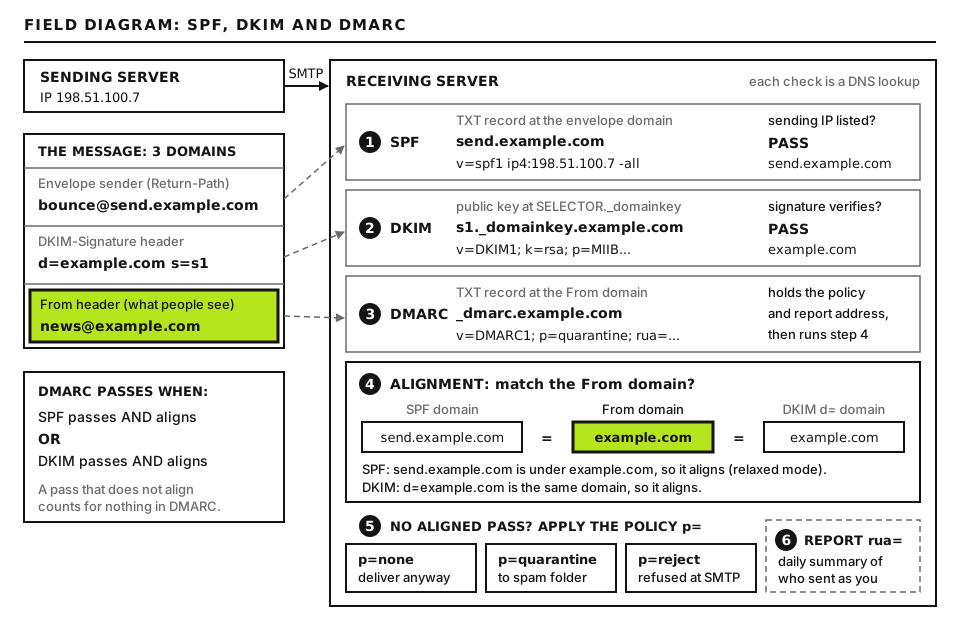
DMARC ties SPF and DKIM to the From domain, applies your policy and reports back to you. Open full size
SPF, DKIM and DMARC exist to let receivers detect it:
SPF lists the servers allowed to send with your domain in the envelope sender.
DKIM lets your legitimate services sign messages with a key published in your DNS.
DMARC ties them to the visible From domain: a message passes only if SPF or DKIM passes for a domain that aligns with the From domain. It also tells receivers what to do with failures (the policy) and where to send reports.
Backscatter is the bounce side of spoofing. Some receiving servers accept a message first and check whether the recipient exists later. When it does not, they send a bounce to the envelope sender, which the spammer set to your address. You receive the bounce for mail you never sent. Properly configured receivers reject during the SMTP conversation instead, so the bounce goes to the spammer’s server, not you.
DMARC tag
Example
What it does
p
p=reject
Policy for the domain: none (monitor), quarantine (spam folder) or reject
sp
sp=reject
Policy for subdomains; defaults to the p value if omitted
pct
pct=25
Under the original DMARC specification, applies the policy to that share of failing mail
rua
rua=mailto:dmarc@example.com
Where receivers send daily aggregate reports
adkim / aspf
adkim=r
Alignment mode: r (relaxed, subdomains match) or s (strict, exact match)
A note on pct: the IETF’s revised DMARC standard, published in 2026 as RFC 9989, removes pct and replaces it with a t (testing) tag. Receivers that still follow the original specification, RFC 7489, keep honoring pct and ignore t, so for now a ramp-up with pct still works at many receivers. Check current receiver support before relying on either.
Before you start
You need access to your domain’s DNS, the admin settings of every service that sends mail as your domain, and a mailbox to receive DMARC reports (a dedicated address such as dmarc@example.com is best, because reports arrive daily). DNS checks run with dig on your own computer (built in on macOS and Linux; WSL or Resolve-DnsName on Windows). Report files are processed on your computer too.
Before you change a DNS record, copy its current value somewhere safe so you can roll back in minutes. Changes to DMARC take effect as soon as receivers’ cached copies expire, usually within the record’s TTL.
Step 1: Spoofing or a compromised account?
The fix is completely different, so confirm which you have. Open one of the bounces and find the returned original message, then read its Received: headers from the bottom up.
Spoofing: the first server in the chain is not yours or any provider you use. It is an unknown IP, often in a country you do not operate in. Your sent folder and your provider’s logs show nothing.
Compromise: the message passed through your mail provider’s servers, carries a valid DKIM signature for your domain, or appears in your sent folder or provider log. Someone has your password; change it, enable multi-factor authentication and follow FG-44 for blocklist fallout.
Then check your current DMARC record on your computer:
dig +short TXT _dmarc.example.com
Replace example.com with your domain. +short prints just the record. Good output looks like "v=DMARC1; p=reject; rua=mailto:dmarc@example.com". Bad output is nothing at all (receivers have no instructions, so forgeries are judged only by spam filters) or p=none with no rua (no protection and no visibility). If you have no record, publish this TXT record at _dmarc.example.com today:
v=DMARC1; p=none; rua=mailto:DMARC_REPORT_ADDRESS
This is a DNS record value you enter in your DNS provider’s panel, with host or name _dmarc. DMARC_REPORT_ADDRESS is the mailbox that will receive reports. p=none changes nothing about delivery yet; it starts the flow of reports so you can see every source using your domain. If the address is at a different domain from the one you are protecting, that other domain must publish an authorization record, example.com._report._dmarc.REPORT_DOMAIN with the value v=DMARC1; hosted DMARC report services set that up for you.
Step 2: Read DMARC aggregate reports
Within a day or two, receivers such as Google, Microsoft and Yahoo start emailing aggregate reports: compressed XML files (.zip or .gz) summarizing every message they saw claiming your domain. Each report covers about one day from one receiver.
A single record inside a report looks like this, shortened:
This is a report file you open and read, not a command. What each part means:
report_metadata: who sent the report (org_name) and the period it covers. UNIX_START and UNIX_END stand for Unix timestamps; convert them with date -u -d @UNIX_START on Linux or date -u -r UNIX_START on macOS.
policy_published: your DMARC record as the receiver saw it. Useful to confirm a change has been picked up.
source_ip and count: one sending IP and how many messages it sent claiming your domain.
policy_evaluated: the DMARC verdict. dkim and spf here mean aligned pass or fail. disposition is what the receiver did: none, quarantine or reject.
identifiers:header_from is the visible From domain. Some reporters also include envelope_from.
auth_results: the raw SPF and DKIM results and the domains they were checked against, before alignment.
The example above is the most common pattern you will find: a legitimate CRM that passes SPF and DKIM for its own domain, so raw results pass but aligned results fail. That is a forgotten sender, not an attacker, and it will be blocked when you move to reject unless you fix it.
Reading XML by hand gets old fast. Free and paid DMARC report processors (dmarcian, Postmark’s DMARC digests, EasyDMARC, or the open source parsedmarc) turn reports into a table of sources. To peek at one file on your computer:
gunzip -c REPORT_FILE.xml.gz | xmllint --format - | less
REPORT_FILE.xml.gz is a report attachment you saved. gunzip -c decompresses it to the screen without changing the file; for .zip files use unzip -p REPORT_FILE.zip instead. xmllint --format - indents the XML read from the pipe (it ships with libxml2 on macOS and most Linux systems). less lets you scroll; press q to quit.
Step 3: Find and align the senders you forgot
Collect two to four weeks of reports, then sort every source IP into three groups:
Yours and aligned: your mailbox provider, your website’s SMTP provider. Nothing to do.
Yours but not aligned: CRMs, help desks, invoicing and billing tools, booking systems, e-commerce platforms, survey tools, newsletter services, a forgotten server in the office. Look up the IP’s reverse DNS (dig +short -x SOURCE_IP) to identify the service.
Not yours: unknown IPs failing everything. These are the spoofers; DMARC enforcement will deal with them.
For each service in group 2, open its domain authentication or sender settings and set up both of these where offered:
Custom DKIM: the service gives you one or more CNAME or TXT records, so it signs with d=example.com (or a subdomain) instead of its own domain. This alone makes DMARC pass and survives forwarding, so it is the most important step.
Custom return-path: a CNAME such as bounces.example.com pointing to the service, which makes SPF align too.
If a service offers neither, send its mail from a subdomain you dedicate to it, or replace the service. Do not keep adding include: mechanisms to your SPF record to “fix” DMARC: it only helps if the envelope sender is your domain, and SPF has a limit of ten DNS lookups, after which it returns a permanent error.
Also watch for forwarding: messages forwarded by mailing lists or a recipient’s own rules often fail SPF at the next hop. DKIM usually survives, which is another reason custom DKIM matters more than SPF.
Step 4: Move from none to quarantine to reject safely
Once your reports show every legitimate source aligned, tighten the policy in stages, waiting at least a week or two at each stage and checking reports for legitimate mail being caught.
These are four successive values for the same TXT record at _dmarc.example.com; use one at a time. DMARC_REPORT_ADDRESS is your report mailbox. pct=25 asks receivers that support it to apply the policy to about a quarter of failing messages and treat the rest one level more leniently, which limits the damage if you missed a sender. Leaving pct out means 100. sp sets the policy for subdomains: use the same level as p unless a subdomain has its own DMARC record. Good signs at each stage: disposition quarantine or reject appears only on rows from unknown IPs. Bad signs: a known service showing quarantine or reject; go back one stage and fix its alignment.
Protect domains and subdomains that never send mail as well. Publish v=spf1 -all as their SPF record and v=DMARC1; p=reject as their DMARC record, so attackers cannot simply spoof an unused domain instead.
DMARC only protects your exact domain and its subdomains. Lookalike domains, such as a swapped letter or a different extension, are not covered. Watch for them and report abuse to the registrar.
Step 5: Deal with backscatter
You cannot stop backscatter directly, because it comes from other people’s misconfigured servers responding to forgeries you did not send. What you can do:
Enforce DMARC and SPF. With p=reject and a strict SPF record ending in -all, well-run receivers reject forgeries during the SMTP conversation, so fewer bounces are ever generated. This is the most effective long-term fix.
Filter bounces that are not replies to your mail. A genuine bounce quotes a Message-ID created by your own systems. Backscatter quotes Message-IDs from the spammer’s software. A mail rule that moves bounces whose quoted Message-ID does not contain your domain or your provider’s domain into a separate folder keeps your inbox usable.
Turn off catch-all addresses. If your domain accepts mail for any address, spammers forging random addresses at your domain produce bounces that land in your catch-all. Accept only real addresses.
Do not reply to or report each bounce. The servers sending them are not the source, and wave after wave usually fades within days once the spam run ends.
If your own server is the one sending backscatter (accepting mail for unknown users and bouncing it later), fix that too: configure it to reject unknown recipients at the RCPT stage. Servers that send backscatter can end up on lists such as Backscatterer.org.
Advanced: BIMI, briefly
Once your domain is at enforcement, you can publish BIMI (Brand Indicators for Message Identification), which lets supporting mailbox providers show your logo next to authenticated messages. Requirements in short:
DMARC at enforcement:p=quarantine or p=reject, applied to all mail (no reduced pct), and a subdomain policy that is not none.
An SVG logo in the SVG Tiny Portable/Secure (SVG Tiny PS) profile: square, no scripts or external references, served over HTTPS.
A certificate for Gmail and Apple Mail: a Verified Mark Certificate (VMC), which requires a registered trademark, or a Common Mark Certificate (CMC), which can be issued without a trademark based on evidence of prior use of the logo. Gmail shows a blue verified checkmark only with a VMC. Certificates come from authorized certificate authorities such as DigiCert and Sectigo, and are paid annually.
A DNS record: a TXT record at default._bimi.example.com with a value such as v=BIMI1; l=https://example.com/LOGO_FILE.svg; a=https://example.com/CERT_FILE.pem, where LOGO_FILE and CERT_FILE are your hosted logo and certificate.
Support and display rules differ by provider and change over time, so check each one’s current documentation. BIMI does not improve delivery by itself; the protection comes from the DMARC enforcement it requires.
When to contact your host
Open a ticket if your host runs your mail or DNS and you need help publishing records, if bounces show your own server accepting and then bouncing mail for unknown users, or if you suspect a mailbox on their platform is compromised. Include:
Two or three complete backscatter bounces, with headers.
The UTC time range when the bounces started.
Your current SPF and DMARC records from dig.
A summary of DMARC report sources, especially any IP belonging to the host that fails alignment.
The list of services you know send as your domain.
Any recent change, such as a new CRM, a DNS move or a password reset.
Use the diagnostic tools to check SPF, DKIM and DMARC records. If customers are receiving fraudulent payment requests in your name right now, start at the Emergency Room.
Did this fix it?
Still stuck? Start again from what you can see in the Emergency Room.
Still stuck?
Print a free one-page checklist to keep, or open the Emergency Room if the symptom does not match.
Someone is in your mailbox: contacts get spam from you, replies vanish or your provider blocked sending. Lock the attacker out, remove their rules and forwarding, then get delisted.
Your host suspended the account over malware, phishing or outgoing spam. Decode the abuse notice, find the mailer script or stolen mailbox, clean every site on the account and get reinstated.
An email says your site has a vulnerability, broke copyright, is about to lose its domain or will be suspended. Most are scams, some are real. Verify each one by logging in to the real account yourself, never through the link in the email.