
HTTP Status Codes Cheat Sheet: What Each Code Means for Your Website
Every HTTP status code a site owner meets, from 1xx to 5xx plus Nginx and Cloudflare extras, with the likely WordPress or hosting cause, the first thing to check and the SEO impact.
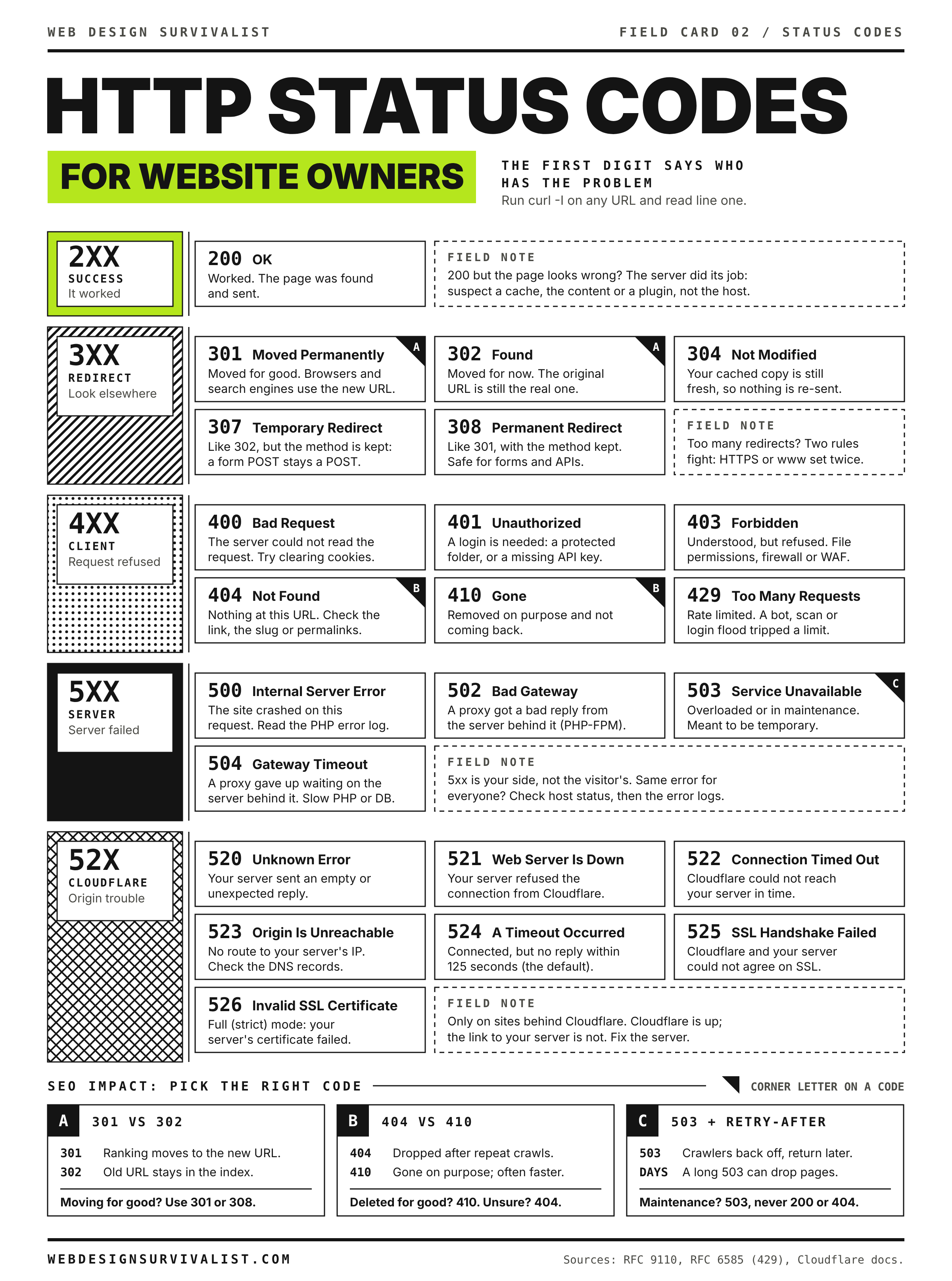
Every response a web server sends starts with a three-digit status code. The first digit is the class: 1xx informational, 2xx success, 3xx redirection, 4xx the request was wrong or not allowed, 5xx the server failed. The codes and their meanings are defined in RFC 9110 (HTTP Semantics) and a few extension RFCs, with a handful of non-standard codes added by Nginx and Cloudflare. This sheet gives the meaning, the usual WordPress or hosting cause, the first thing to check and how search engines treat each one.
See the real code first. Browsers, caching plugins and CDNs can show a friendly page over the real status. Check from a terminal:
curl -sI https://example.com/PAGE_PATH
curl -sIL https://example.com/PAGE_PATH          # follow redirects, one block per hop
curl -s -o /dev/null -w '%{http_code} %{time_total}s\n' https://example.com/
PAGE_PATH is the part of the URL after the domain. In the browser, open developer tools, choose the Network tab, reload and read the Status column.
How search engines treat each class
| Class | Google’s documented behavior | What it means for you |
|---|---|---|
| 2xx | The content may be considered for indexing. A 2xx page that says “not found” can be classed as a soft 404. | Make real error pages return a real error code. |
| 301, 308 | Strong signal that the redirect target should be the canonical URL. | Use for permanent moves. |
| 302, 303, 307 | Weak signal that the target should be canonical. | Use for genuinely temporary moves. |
| Redirect chains | Googlebot follows a limited number of hops (Google documents 10) before reporting a redirect error. | Point old URLs straight at the final URL. |
| 4xx (except 429) | Treated as content that does not exist. Indexed URLs are dropped. Not a way to slow crawling. | 404 and 410 both remove pages. Do not return 401 or 403 to throttle bots. |
| 429 and 5xx | Google temporarily slows crawling. Indexed URLs are kept for a while but are removed if the errors continue. | A short outage is survivable. A long one costs rankings. |
| DNS and connection errors | Treated like server errors. | Same advice as 5xx. |
1xx: informational
| Code | Name | What it means | Where you see it | SEO impact |
|---|---|---|---|---|
| 100 | Continue | The server is willing to receive the request body the client asked to send (Expect: 100-continue). |
Large uploads with curl and some API clients. | None. |
| 101 | Switching Protocols | The connection is upgrading, usually to WebSocket. | Live chat, page builders and dev servers using WebSockets. | None. |
| 103 | Early Hints | Preliminary headers (usually Link: rel=preload) sent before the final response so the browser can start fetching assets. |
CDNs and servers with Early Hints enabled. | None directly; can improve load time. |
2xx: success
| Code | Name | What it means | WordPress and hosting notes | SEO impact |
|---|---|---|---|---|
| 200 | OK | Request succeeded and the body is the result. | A 200 on a page that shows an error, an empty page or a “nothing found” message is still a problem. | Indexable. Error content on a 200 is a soft 404. |
| 201 | Created | A new resource was created. | REST API calls that create posts or users. | None. |
| 202 | Accepted | Request accepted for later processing. | Queued jobs and webhooks. | None. |
| 204 | No Content | Success with no body. | Beacons, analytics endpoints, some REST and AJAX calls. | None. |
| 206 | Partial Content | Only the requested byte range was sent. | Video and audio seeking, resumable downloads. | None. |
3xx: redirection
| Code | Name | Permanent? | Method kept? | Typical use and cause | SEO impact |
|---|---|---|---|---|---|
| 301 | Moved Permanently | Yes | Not guaranteed. Browsers may change POST to GET. | HTTP to HTTPS, www to non-www, changed slugs. WordPress itself sends 301 for canonical URL fixes. | Strong canonical signal. Ranking signals pass to the target. |
| 302 | Found | No | Not guaranteed. Browsers may change POST to GET. | Many plugins and wp_redirect() default to 302. Login and logout flows. |
Weak canonical signal. If left for a permanent move, the old URL may stay indexed. |
| 303 | See Other | No | No. Always followed with GET. | Post, redirect, get pattern after a form submission so a refresh does not resubmit. | Weak signal; rarely matters. |
| 304 | Not Modified | Not a redirect | Not applicable | Reply to a conditional request (If-Modified-Since, If-None-Match). The cached copy is still valid. |
Saves crawl bandwidth. Google notes it does not affect indexing. |
| 307 | Temporary Redirect | No | Yes | Temporary moves where a POST must stay a POST. Browsers also show an internal 307 when HSTS forces HTTPS before any request is sent. | Weak canonical signal. An HSTS internal 307 never reaches the server or Google. |
| 308 | Permanent Redirect | Yes | Yes | Permanent moves of URLs that receive POST, such as API endpoints. Defined in RFC 7538, now in RFC 9110. | Treated like 301. |
| 300 | Multiple Choices | Varies | Not applicable | Rare. Some content negotiation setups. | Avoid. |
Redirect loop (“too many redirects”) is not a status code. It is a chain of 3xx responses that never ends, usually HTTPS being forced in two places that disagree, such as a CDN in Flexible SSL mode plus a WordPress HTTPS redirect, or siteurl and home disagreeing with the server rules.
4xx: client errors
| Code | Name | What it means | Likely WordPress or hosting cause | First check | SEO impact |
|---|---|---|---|---|---|
| 400 | Bad Request | The server could not parse the request. | Oversized or corrupt cookies (Nginx shows “Request Header Or Cookie Too Large”), malformed URLs, broken API clients. | Retry in a private window. If that works, clear cookies for the domain. | Dropped from the index if persistent. |
| 401 | Unauthorized | Authentication is required or failed. The server must send a WWW-Authenticate header with it. |
HTTP basic auth on a staging site or on wp-admin, REST API calls without valid application passwords or cookies. |
Is password protection set in the control panel or .htaccess? Are credentials sent? |
Not indexed. Fine for staging; wrong for public pages. |
| 403 | Forbidden | The server understood the request and refuses it. Re-sending the same credentials will not help. | File permissions too strict, a missing index file with directory listing off, ModSecurity or WAF rules, security plugin blocks, country or IP blocks, Deny rules in .htaccess. |
Server error log and WAF log for the request. Files usually 644, folders 755. | Not indexed. Treated as not found. |
| 404 | Not Found | Nothing exists at this URL (or the server will not say). | Deleted or renamed content, permalinks not flushed after a migration, missing rewrite rules on Nginx, uploads not copied, a plugin’s custom post type deactivated. | Re-save Settings, Permalinks (or wp rewrite flush). If every post 404s but the home page works, the rewrite rules are missing. |
Removed from the index over time. Normal for genuinely gone pages. |
| 405 | Method Not Allowed | The URL exists but not for this method. Must include an Allow header. |
A form POSTing to a static HTML page or a cached copy, a REST route that only accepts GET, a server block on PUT or DELETE. | Check the method in the Network tab and whether a static or cached page is answering. | Rarely matters for pages. |
| 406 | Not Acceptable | The server cannot produce a format the client accepts. | Some ModSecurity setups return 406 when a rule blocks a request. | ModSecurity audit log or the host’s firewall log. | Not indexed if a page returns it. |
| 408 | Request Timeout | The client took too long to send its request. | Slow or dropped client connections, idle keep-alive connections being closed. | Usually harmless unless frequent; check for slow upload links. | Minor. |
| 409 | Conflict | The request conflicts with the current state. | REST API edits racing each other. | Application logs. | None. |
| 410 | Gone | The resource was deliberately removed and will not return. | Set by redirect plugins or server rules for retired content and spam URLs left after a hack. | Confirm the rule is intentional. | Google documents treating 4xx codes alike, so 410 and 404 both remove the page. 410 states your intent clearly. |
| 411 | Length Required | The request needs a Content-Length. |
Old proxies, some API clients sending empty POSTs. | Client code. | None. |
| 412 | Precondition Failed | An If-Match or similar condition failed. |
Conditional API updates. | Client code. | None. |
| 413 | Content Too Large | The request body is bigger than the server allows. Called “Payload Too Large” in older specs. | Nginx client_max_body_size or Apache LimitRequestBody lower than the upload. When only PHP’s upload_max_filesize is exceeded, WordPress shows its own error instead. |
Compare the file size to the web server and PHP limits. | None for pages. |
| 414 | URI Too Long | The URL is longer than the server accepts. | Redirect loops that append query parameters each hop, huge GET forms, filter plugins building giant query strings. | Look at the URL; it will be obviously enormous. | Not indexed. |
| 415 | Unsupported Media Type | The body format is not supported. | REST calls with the wrong Content-Type. |
Request headers. | None. |
| 416 | Range Not Satisfiable | A byte range outside the file was requested. | Media players asking for bytes past the end, files replaced mid-download. | Usually harmless. | None. |
| 418 | I’m a teapot | Trivia only. From an April Fools’ RFC (RFC 2324). RFC 9110 marks it as reserved and unused. | Some sites use it as a joke response to bots. | Not applicable. | Do not use on real pages. |
| 421 | Misdirected Request | The request reached a server that cannot answer for that host name. | HTTP/2 connection reuse across host names that share a certificate but not a server, or a TLS SNI host that does not match the Host header (Apache httpd can return 421 in this case). |
Check certificates and virtual hosts for each host name on the shared IP. | Not indexed if persistent. |
| 422 | Unprocessable Content | Well-formed request with invalid data. | API validation errors. | Response body for the error message. | None. |
| 425 | Too Early | The server will not process a request sent in TLS early data (0-RTT) because it could be replayed. | CDNs with 0-RTT enabled. | Rare; client retries automatically. | None. |
| 426 | Upgrade Required | Client must switch protocols. | Endpoints that require a newer protocol. | Response Upgrade header. |
None. |
| 428 | Precondition Required | The server requires a conditional request. | APIs preventing lost updates. | Client code. | None. |
| 429 | Too Many Requests | Rate limited. May include Retry-After as seconds (Retry-After: 120) or an HTTP date. |
Security plugins limiting logins, host or CDN rate limits, WAF bot rules, an uptime monitor or crawler hammering the site, API limits on outbound calls. | Which IP is limited and by what layer (plugin, server, CDN)? Whitelist your monitors. | Google slows crawling. Persistent 429s can drop pages, just like 5xx. |
| 431 | Request Header Fields Too Large | Headers, usually cookies, exceed the limit. | Too many or too large cookies on the domain. | Clear cookies for the domain and retest. | Not usually seen by crawlers. |
| 451 | Unavailable For Legal Reasons | Blocked because of a legal demand (RFC 7725). | Legal takedowns, geoblocking for legal reasons. | Confirm with whoever set the block. | Not indexed in the affected region. |
401 vs 403 at a glance
| Question | 401 Unauthorized | 403 Forbidden |
|---|---|---|
| Meaning | Who are you? Credentials missing or wrong. | I know the request and I refuse it. |
| Would logging in help? | Yes | No (or not with these rights) |
| Required header | WWW-Authenticate |
None |
| Common cause | Basic auth password, REST API auth | Permissions, WAF, IP block, no index file |
404 vs 410 at a glance
| Question | 404 Not Found | 410 Gone |
|---|---|---|
| Meaning | Not here, permanence unknown | Removed on purpose, not coming back |
| Use when | Default for anything missing | Retired content, spam URLs injected by a hack |
| Better alternative | A 301 to the closest real replacement if one exists | Same |
5xx: server errors
| Code | Name | What it means | Likely WordPress or hosting cause | First check | SEO impact |
|---|---|---|---|---|---|
| 500 | Internal Server Error | Generic failure inside the server or application. | PHP fatal error from a plugin or theme, a syntax error in .htaccess, PHP memory exhausted, wrong file ownership on some PHP handlers. |
PHP error log, or set WP_DEBUG_LOG and read wp-content/debug.log. Rename .htaccess to test. |
Crawl slows; long outages drop pages. |
| 501 | Not Implemented | The server does not support the method. | Unusual HTTP methods blocked by the server or a WAF. | Which method was sent? | Rare. |
| 502 | Bad Gateway | A proxy or gateway got an invalid response from the upstream server. | PHP-FPM stopped, crashed or restarted; the upstream closed the connection; a CDN or load balancer cannot read the origin’s reply. | Is PHP-FPM running? Check the web server error log for “upstream prematurely closed” or “connect() failed”. Restart PHP from the control panel. | Same as 500. |
| 503 | Service Unavailable | Temporarily unable to handle the request. May include Retry-After. |
WordPress maintenance mode (.maintenance file), server overload, PHP worker or process limits reached, host resource limits, deliberate maintenance pages. |
Is there a .maintenance file in the root? Check resource usage and PHP worker limits. |
The correct code for planned downtime. Short periods are fine; prolonged 503s drop pages. |
| 504 | Gateway Timeout | A proxy did not get a reply from upstream in time. | Slow PHP (heavy plugins, slow database queries, external API calls that hang), timeouts on the proxy shorter than PHP’s max_execution_time. |
Slow query log, wp profile, server error log. Which request is slow? |
Same as 500. |
| 505 | HTTP Version Not Supported | The server refuses the HTTP version used. | Misbehaving clients or very old servers. | Client and server versions. | Rare. |
| 507 | Insufficient Storage | The server cannot store what is needed (from WebDAV). | Some hosts return it when the disk or account quota is full. | Disk usage and quota. | Same as 500. |
| 508 | Loop Detected | A server detected an infinite loop (from WebDAV). | CloudLinux shared hosting uses 508 for “Resource Limit Is Reached” when an account hits its CPU, memory or process limits. | Resource usage graphs in the control panel. Look for bot traffic or runaway cron. | Same as 500. |
| 511 | Network Authentication Required | The network needs a login first. | Hotel and airport Wi-Fi captive portals, not your site. | Try another network. | None. |
Nginx non-standard codes
| Code | Meaning | Where it appears | Likely cause | First check |
|---|---|---|---|---|
| 444 | No Response. Nginx closes the connection without sending anything. | Access log; the client sees a dropped connection. | A deliberate return 444; rule to drop bad bots or requests for unknown host names. |
Search the Nginx config for 444. |
| 494 | Request Header Too Large | Internal code; the client and the access log normally see 400 (“Request Header Or Cookie Too Large”). Usable in error_page. |
Headers or cookies larger than large_client_header_buffers. |
Clear cookies; review buffer settings. |
| 495 | SSL Certificate Error | Internal code; the client and the access log normally see 400. Usable in error_page. |
The client certificate presented failed verification (mutual TLS). | Only relevant if you require client certificates. |
| 496 | SSL Certificate Required | Internal code; the client and the access log normally see 400. Usable in error_page. |
A required client certificate was not sent. | ssl_verify_client settings. |
| 497 | HTTP Request Sent to HTTPS Port | Internal code; the client and the access log normally see 400 (“The plain HTTP request was sent to HTTPS port”). error_page 497 can redirect it instead. |
A plain http:// request to port 443, often from a wrong port in a link, a proxy or a load balancer. |
Check URLs with explicit ports and proxy settings. |
| 499 | Client Closed Request | Access log only; nothing is sent. | The visitor, a monitor or a proxy gave up before Nginx answered. Many 499s on PHP requests mean the backend is too slow, or an upstream proxy (CDN or load balancer) times out before Nginx does. | Request times in the access log; compare proxy timeouts. |
Cloudflare 5xx codes
These appear only when traffic goes through Cloudflare’s proxy (orange cloud). They describe the connection between Cloudflare and your origin server, so the problem is almost always at the origin or in its firewall, not at Cloudflare.
| Code | Cloudflare name | What happened | Likely cause | First check |
|---|---|---|---|---|
| 520 | Web server returns an unknown error | The origin sent an empty, invalid or unexpected response. | PHP or the web server crashing mid-response, the origin resetting the connection, response headers too large. | Origin error logs at the time of the error. Request the origin directly (see recipe below). |
| 521 | Web server is down | The origin refused the connection. | Web server stopped, or a firewall or security tool on the server blocking Cloudflare’s IP ranges. | Is the web server running? Are Cloudflare IP ranges allowed in the firewall? |
| 522 | Connection timed out | The TCP connection to the origin was not completed in time. | Origin overloaded, firewall silently dropping Cloudflare packets, wrong origin IP in the DNS record. | Confirm the A or AAAA record points at the current server. Check load and firewall drops. |
| 523 | Origin is unreachable | Cloudflare could not route to the origin. | Wrong or outdated IP in DNS, origin network down. | DNS records in the Cloudflare dashboard; host status. |
| 524 | A timeout occurred | Connected, but no HTTP response before Cloudflare’s Proxy Read Timeout (125 seconds by default at the time of writing; Enterprise zones can raise it). Check Cloudflare’s current connection limits page. | Long-running PHP: imports, exports, backups, reports, slow queries. | Which URL? Move long jobs to WP-CLI or a background queue, or bypass the proxy for that host name. |
| 525 | SSL handshake failed | TLS negotiation with the origin failed (SSL mode Full or Full strict). | No certificate or no HTTPS listener on port 443 at the origin, protocol or cipher mismatch, SNI problems. | openssl s_client -connect ORIGIN_IP:443 -servername example.com |
| 526 | Invalid SSL certificate | SSL mode Full (strict) and the origin certificate is not valid. | Expired, self-signed or wrong host name on the origin certificate. | Renew the origin certificate or install a Cloudflare Origin CA certificate. |
| 527 | Railgun error | Historical: a connection problem with Railgun, a Cloudflare product that has been retired and is no longer in Cloudflare’s error docs. | You should not see this today. | Not applicable. |
| 530 | (Shown with a 1xxx error) | A Cloudflare-side error; the page body shows a 1xxx code that explains it. | Cloudflare could not resolve or reach the origin host name. Common pairings: 1016 Origin DNS error (the record Cloudflare points to does not resolve), 1033 Argo Tunnel error (a Cloudflare Tunnel that is not connected). | Read the 1xxx number on the error page and look it up in Cloudflare’s docs. |
Cloudflare 1xxx errors you are likely to meet
| Error | Meaning | Usual fix |
|---|---|---|
| 1001 | DNS resolution error | The domain is not active on Cloudflare or the record is missing. |
| 1003 | Direct IP access not allowed | Visit by host name, not by Cloudflare IP. |
| 1015 | You are being rate limited | A rate limiting rule matched; review rules or wait. |
| 1016 | Origin DNS error | Fix the CNAME or A record target that Cloudflare uses for the origin. |
| 1020 | Access denied | A firewall or WAF custom rule blocked the visitor; check Security Events. |
Common recipes
Find out which layer produced the error
# 1. Through the CDN, as visitors see it
curl -sI https://example.com/
# 2. Straight to the origin, skipping DNS and the CDN
curl -sI https://example.com/ --resolve example.com:443:ORIGIN_IP
# 3. Look at the server header and any CDN headers
curl -sI https://example.com/ | grep -iE '^(server|cf-ray|x-cache|via|retry-after):'
ORIGIN_IP is your web server’s real IP address from the hosting panel. If step 2 works and step 1 fails, look at the CDN. If both fail, look at the server.
Map a redirect chain or loop
curl -sIL https://example.com/ | grep -iE '^(HTTP/|location:)'
curl -sIL --max-redirs 5 http://example.com/
Each HTTP/ line is one hop. Two locations alternating is a loop. Check CDN SSL mode, server redirect rules, the home and siteurl options, and redirect plugins, in that order.
500 after an update
tail -n 50 wp-content/debug.log           # if WP_DEBUG_LOG is on
wp plugin deactivate PLUGIN_SLUG --skip-plugins --skip-themes
mv .htaccess .htaccess.bak                # Apache only; re-save permalinks after
502 or 504 under load
grep -E 'upstream|timed out|max_children' /PATH/TO/error.log | tail -n 20
wp profile stage --url=https://example.com/SLOW_PATH/
wp profile is a separate package (wp package install wp-cli/profile-command). Log paths vary by host. max_children warnings in the PHP-FPM log mean all PHP workers were busy.
Planned maintenance without losing rankings
HTTP/1.1 503 Service Unavailable
Retry-After: 3600
Serve 503 with Retry-After for the downtime, never a 200 “back soon” page and never a redirect to a maintenance URL.
Gotchas
- Cached errors. Page caches and CDNs can cache a 404 or 5xx response. Purge after fixing, then retest with curl.
- Custom error pages that return 200. A pretty “page not found” template served with status 200 becomes a soft 404 in Search Console.
- Redirecting every 404 to the home page. Search engines tend to treat these as soft 404s, and visitors lose the clue that the page moved.
- HSTS 307 is not real. An “Internal Redirect” 307 in the browser comes from the browser’s own HSTS list. The server never saw that request.
- WordPress can send its own codes. WordPress sends 404 for missing posts, 503 in maintenance mode and 500 from the fatal error handler. A plugin can override any of them.
- Bots and humans can see different codes. WAF and bot rules may serve 403 or a challenge only to certain user agents or countries. Test from more than one location.
- 499 and 444 never reach the browser. They appear in Nginx logs only, so a visitor cannot report them.
- Cloudflare 52x points at the origin. Pausing Cloudflare usually shows the underlying problem directly, but it also exposes your origin IP.
Did this fix it?
Still stuck? Start again from what you can see in the Emergency Room.
Need the full fix?
Cheat sheets are quick reference. The field guides walk you through each emergency step by step.
Open the Emergency Room